Hey everyone, I’m excited about this new feature – it’s one that I will use often and I hope you will too.
We’ve have created a quick and easy way for you to create your own templates. A template allows you to easily replicate wiki pages from the same design or style. They save time because each wiki editor does not have to create the document format on their own.
Here’s how to create your own template:
Create a new page
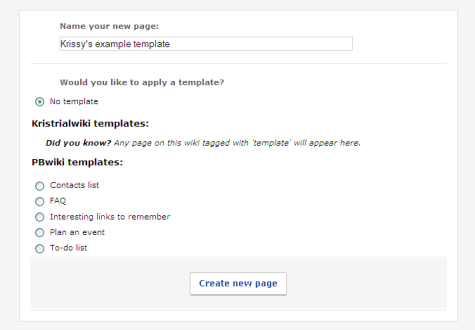
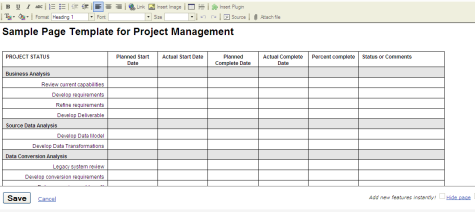
Copy and paste your original template into the wiki
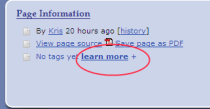
Tag your wiki page with the word template (in lower case). The tag feature is at the bottom left of your wiki (click on the +)
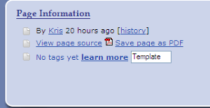
You will see your new wiki template when you create a new page

Do you have a template that you’re excited to use or think will be useful to other users?
 PBworks Official Blog
FANTASTIC. I’ve been waiting for this feature.
I’m still having trouble understanding the process of editing/creating material on the wiki site. Can someone help me please?
This is fabulous–I found it so useful this weekend, preparing wiki pages for a presentation to student teachers. No cutting and pasting!
Is this feature available on paid-for wikis only or is it for all wikis?
What I’d really like to do is create a wiki that looks just like my website so I can have a seemless user experience. I’m able to do this with blogger-hosted blogs. Unless you look at the URL, you can’t tell you’ve left the site. I’m not sure if this feature will enable this or not. . .
nicely done. this shoudl be great. you guys should demo a stock tracker page or competition page with RSS feeds based on keywords. PBwiki is great for google gadgets.
I can’t seem to get it to work. Does this only work in point–and-click mode? I still keep mine set to classic editor because P&C scrambled my internal page links.
I would also like to know if this is available on paid-for wikis of if it for free ones as well
I can create the template just fine, and I see it when I go to create a New Page. However, when I enter the new page’s name, select the appropriate template, and click Create New Page, nothing happens except that my form resets. It doesn’t work.
That’s excellent, I’ll include this new feature on our blog.
I cannot seem to get my template to show up under templates in Create New Page?
For everyone else who was struggling to make their templates appear, I just worked it out. The key word here is ‘tagged’. Don’t forget to go in and tag your page with the word template – then it all works a treat! Even in the free version 🙂
Among the top rated electronic toys for Christmas 2011Play – Station 3 tops the list.
fixing my life, so to speak, and my first games
were on my personal computer that i still have to this day.
The song is featured in ‘Call of Duty: Ghosts,’ the highly-anticipated, all-new entry
in the Call of Duty franchise that’s has over 100 million players worldwide.
This site was… how do I say it? Relevant!!
Finally I’ve found something which helped me.
Thanks a lot!