As part of our spam abatement we’ve been doing some research about how to identify various kinds of Spam. The following data is from our test of Spam musubi. Initial results are promising.
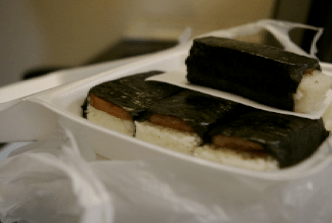
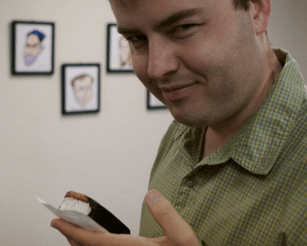


As part of our spam abatement we’ve been doing some research about how to identify various kinds of Spam. The following data is from our test of Spam musubi. Initial results are promising.
I just spoke to Nathan, our CTO, about the Schtuff transition. He told me that he’s working with Carl at Schtuff to finalize importing the Schtuff wikis to PBwiki. We expect to give the technical thumbs-up to the Schtuff team within 24 hours. After that, Schtuff will begin contacting its (our?) users to let them know how to migrate their wikis. As far as we understand, the trains are all running on time for the import to happen this week or early next week.
If you have questions, or to stay current on the latest Schtuff-transition news, check out this forum post.

So last time, we went over everything that went into creating a table of contents for your page quickly and effectively using the Point-and-Click Editor. Today, we follow in the same vein, but advanced users can skip down to the bottom and read about some of the ways to style your tables using CSS, in case you would like to do something like get rid of the borders, change the colors, etc.
Before we get into all that however, we first need to make the table itself. Read on ahead to find out how to make a table using the Point-and-Click Editor and other options to modify an existing table, such as adding rows and columns, removing rows and columns, merging cells, etc.
Our very own Nathan!
Nathan is the CTO of Pbwiki.com, a Palo Alto-based startup that is now the world’s largest hoster of wikis.
Nathan will be speaking about “how to keep a popular web service from melting when it becomes popular – Debian, PHP, Apache, Lighttpd, Squid, Memcache, MogileFS and MySQL.”
Nathan was a President Scholar and received a BS in Computer Systems Engineering at Stanford University.
More information from the Stanford Linux Users and Open Source Group.
Here’s an email I wrote to our educational advisory panel (join here) last night:
Well, it’s 10:25pm and I should be getting ready to sleep, but I can’t without getting this email out!! Let me quickly tell you about something we did to make PBwiki easier for your coworkers and students.
We just rolled out a new FrontPage for new wikis that makes it easier to get started. Now when you create a new wiki, you’ll see clearer text, help documents, and quick videos that give you a tour of how to use PBwiki. All this stuff is now on the FrontPage.
Check it out by making a new wiki at http://www.pbworks.com.
Here’s what the new FrontPage looks like (click here to try it out):

The new FrontPage is one of the ways we’re making it easier to get started using PBwiki. Please tell your friends!

There are a few questions I keep seeing in the forums over and over concerning the Point-and-Click editor, and I thought I’d use this space to clear up one of them today: How do I do a Table of Contents (ToC)?
I admit that the answer is not immediately clear like it is on the old Classic editor, where entering the statement “<toc>” on the page would create a table of contents linking to every header on that page created with a “!”, “!!”, or “!!!”.
The idea of the Point-and-Click editor concerning the ToC is exactly the same. Insert a Table of Contents plugin and it will create links from every first, second, and third level header you create. But sometimes you need a little illustration, so here’s everything step by step…
Continue reading “Tip of the Week #19: Inserting a Table of Contents”
Cindy Lane, an instructional technologist, recently presented at an educational event about PBwiki using our Presenter Packs. Her giveaway was one of the most creative we’ve seen!
Yesterday was my pbwiki event…Half of my teachers had actually gone on and logged in and had contributed to the wiki, so I pulled them up front, gave them each TWO packages of 100 calorie peanut butter cookies and told them to find a teacher that had NOT logged on and teach them how, (and give them a package of cookies).
The big prize (peanut butter stuffed pretzels) went to the first person who had logged on, the Project Peanut Butter rubber bracelet went to the last person that logged on…and the three gold wiki keys (coming my way soon I hope!) went to the first two teachers that emailed me (both did this within the following 2 minutes).
Thanks for taking care of my teachers…as you can see, I love ’em too!! and P B W I K I !!!
Cindy even included a video for her educators:
To get your own PBwiki Presenter Pack (including a free t-shirt, white papers to give to your audience, and 3 free Gold wikis to give away–click here.

We just added a tiny sharing sidebar to each wiki. This should make it even easier to share your wiki with friends, colleagues, and anyone else that you want to start collaborating with on your wiki. The sharing sidebar is located beneath the normal sidebar, or, if you have one of the tabbed sidebars, it should appear at the bottom of the Quickstart tab.
Depending on your level of security, you will be given the option to share just a regular link to let others read your wiki, or, another link that will give them full access edit pages, and more. Those who have paid for advanced permissions will have greater control, too. Use these links in e-mail, blogs, chat conversations, tattoo it to your elbow, etc.
The sharing sidebar can be turned off in the admin panel (click “Wiki settings” on the bottom of your wiki).

PBwiki’s really simple, and that’s great, but sometimes, it lets us forget that we’re not only PBwiki users interacting in a peanutty-licious microcosm; instead, we’re webmasters and content creators in our own right, in a vast world full of others who may or may not be PBwiki users. The Internet, with us all involved, is a giant community, and in any community, there are certain expected behaviors that allow us to interact in a meaningful manner with our neighbors.
These behaviors form a few guidelines for basic etiquette in website design and content that apply to everything from Joe’s Vacation Journal Wiki to Giganto Corporate Wiki. I’ll just list them first before discussing them in more detail:
Continue reading “Tip of the Week #18: 5 Rules of Net Etiquette”

PBwiki is going down in history. Namely, PBwiki will be included in a book tentatively titled, “The Teacher’s Guide to Teaching History with Technology: A Handbook for Teachers, by Teachers” by Justin Reich and Tom Daccord of the Center for Teaching History with Technology.
The book, to be published by M.E. Sharpe, has an anticipated publishing date of sometime in Spring, 2008.
On hearing this news Peebers the Undeniable Robot of History ®, a bit of a history buff, clanged his enormous iron feet onto his hassock, clenched his half-bent billiard between his two rows of frighteningly regular enamel teeth and sighed with satisfaction.
–Curt


