Now Available: PBworks (the next generation)

The following is a message from our founder, David Weekly, regarding the launch of PBworks’ next generation business product.

After having grown the product for a number of years beyond its workspace roots (and renaming the company two years ago), towards the end of last year we took stock of what we had accomplished and decided we needed to take what we had grown into organically and make it one cohesive whole.

I hired our Creative Director Dann Ledwick – who had been CEO of a technology and design company – to work with me to offer a modern and consistent look across the product. We went back and forth with dozens of ideas and mockups, trying to find an overall layout that would clearly showcase users’ content, show them where they were in a potentially vast sea of information, and give them clear visual affordances for browsing and modifying people, workspaces, files, and pages.

A lot of the problems of visual scale we’re trying to solve are pretty excitingly vast: making readily available millions of permissioned objects to corporate deployments potentially spanning hundreds of thousands of employees and keeping it all sane for the end user. We referenced operating system file navigators, the visual information hierarchies of modern websites like Facebook, the excellent work of Edward Tufte in minimizing cognitive distraction, and thought hard about the ways we could really make the user’s content shine and make the interface just get out of your way.

This work ends up being reflected in lots of small touches – like a little gear icon that shows up when you hover over a folder: if you click on the gear you get a menu that allows you to manipulate the folder, renaming it, deleting it, changing its permissions, etc.

We’ve tried to make the common actions really in-your-face easy (the file browsing interface now has a HUGE button that says ‘Upload’) and the more complex action clearly discoverable but not distracting. So when you need to do something more obscure, like modify a folder’s permissions, you know how to find it, but it’s not in front of you until you need it.

While we’ve left no pixel untouched in this visual refresh, what you’ll see in this first revision is just the beginning of a process of refinement to explore how people can work together joyfully and effectively. Stay tuned!

Sincerely,
David Weekly, Founder and Chief Product Officer

P.S. If you’d like to get a demonstration of the new PBworks, attend one of our webinars.

Pages & Files: Now 50% More Efficient

We’ve just rolled out a major improvement to all our users, both paid and free.

One of the important elements of PBworks is the ability to organize wiki pages, files, and folders in our Pages & Files manager.  This screen includes a lot of neat capabilities, like being able to drag and drop items between folders, and to upload files simply by dragging them from your desktop to the desired folder.

Today, we made it even better.

The new Pages & Files manager presents a cleaner, uncluttered interface AND provides more information on individual pages and files.  The secret to this seeming paradox is our “More” button, which allows you to see detailed information for the page or file you specify:

Pages & Files Manager

Now, rather than seeing a bunch of repetitive links that appear for each item (e.g. Edit, Rename, Delete, Move), you get a cleaner view with the ability to quickly drill down for the details.

As a by-product of this streamlining, we’re able to fit even more pages and files onto a single screen.  A typical user on a 1368 x 768 screen will be able to see 15 pages/files per screen, versus 10 files per screen on our previous interface.  That’s a 50% improvement.

For more details on using the Pages & Files manager, visit our user manual.

Introducing the PBworks Twitter Widget

As the Internet evolves, PBworks evolves with it.  You can see this evolution at work in the plugins we include in the product.  For a long time, we’ve had two product-specific plugins: YouTube and Skype.  We’ve just added a third: Twitter.

In one sense, we don’t really need to add product-specific plugins.  We have generic plugins like the RSS plugin or the HTML/JavaScript plugin that make it possible to embed just about any widget you want.  But using these generic plugins requires fiddling around with long and complex-looking URLs and scripts.  Therefore, when a product becomes (a) ubiquitous and (b) is clearly here for the long haul, we look into adding a product-specific plugin.

By anyone’s measures, Twitter now clearly qualifies on both counts.

The new Twitter plugin makes it easy to embed either a Twitter feed or search results on a wiki page, with cool Twitter formatting and colors.  For all the details, check out the user manual.

Last Chance For Free Passes To Enterprise 2.0

Each year, we attend the Enterprise 2.0 conference.  Attending helps give us new ideas for the product, as well as helping spread the word about PBworks.

This year, the conference has a special promotion–if we get 80 people to sign up for a free EXPO pass to the show (June 20-23 in Boston), they’ll give us a free full pass.

If you’re thinking about attending the show or will be in Boston at the time of the show, you can sign up for a free pass and do us a favor at the same time.  Tell any friends who might be interested as well!

UPDATE:

A number of folks have commented that the pass price comes up as $50.  This is true, but if you submit, on the very next screen, the $50 is removed from the price, leaving it free.  You will never have to enter a credit card or pay anything.

PBworks launches New Business Hub

Don Draper, meet PBworks.

This morning, we launched New Business Hub, a new product from PBworks that helps new business development professionals at ad agencies like the fictional Sterling Cooper Draper Pryce win more pitches.

Even the glamorous likes of Don Draper and Roger Sterling can benefit from PBworks collaboration, as New Business Hub makes it easy for them to respond to RFPs (requests for proposal), find appropriate examples of past advertisements, and coordinate the pitch process.

If you’re a Mad Man (or woman) and you’d like to learn more about this new product, visit the New Business Hub landing page and register for a demo.

For a quick look at New Business Hub, you can watch a 5 minute video walkthrough.

View Tasks And Milestones By Month

Ever since we introduced Tasks and Milestones, one of the most popular requests has been a calendar view of those tasks and milestones.

Sure, we allowed you to view by date, and even to integrate tasks and milestones into your Outlook calendar, but there’s simply something appealing about being able to see tasks and milestones laid out in the traditional weekly view.

That’s why the latest release of our business products includes the ability to group tasks by month:

Month View Outline

As with the other task and milestone views, you can filter based on to whom the tasks are assigned, and you can also choose to hide completed tasks.

The new monthly view is available immediately to all our business customers.

Announcing Amazon S3 Export

Amazon S3 Export lets you export your PBworks content to your own Amazon Simple Storage Service (S3) account.  You can use S3 Export as an easy way to back up your PBworks network.  You can even set up scheduled backups on a daily basis, and we’ll only export incremental changes.

PBworks already backs up all your data, both within our data center and via offsite backup, but if you like having your own separate backup, Amazon S3 Export is the easiest way to go.

Amazon S3 Export is free for all customers using Business Edition and above, but you will need to pay for your own S3 account.  You can read up on the details in our user manual.

Introducing Image Cropping

One popular feature in PBworks is the ability to embed images on wiki pages.  But what happens if you you only want to show part of an image?  This is pretty common, and most people don’t feel comfortable using tools like Photoshop to modify their images.

That’s why we’ve added the ability to “crop” images to PBworks.  Once you’ve uploaded your image, you can use PBworks to trim away the portions of the image you consider unnecessary.

Here’s how it works:

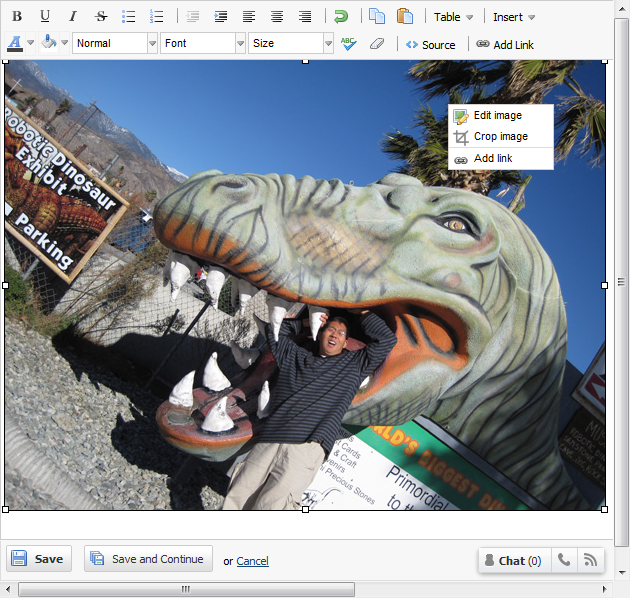
Once you add an image to a wiki page in “Edit” mode, right click and select “Crop Image”

This should bring up a special cropping window where you can drag the cropping selection until you’ve highlighted the part of the image you want to save:

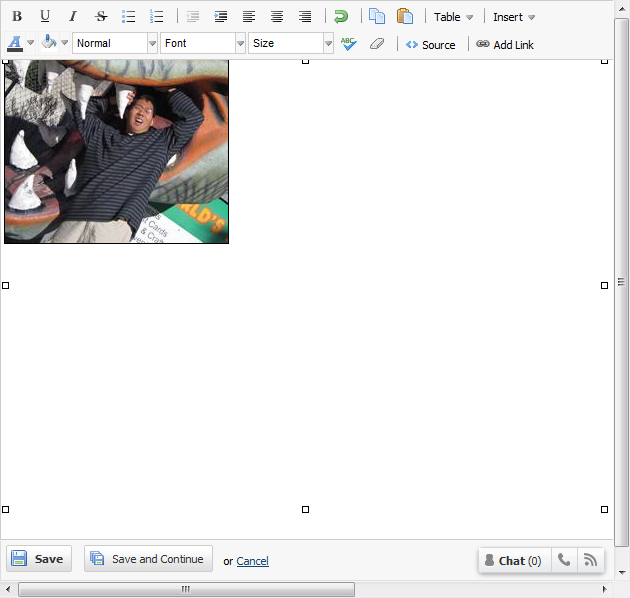
When you click “Crop and Save,” PBworks will crop the image and save the trimmed down image as a new version and return you to the standard Edit window:

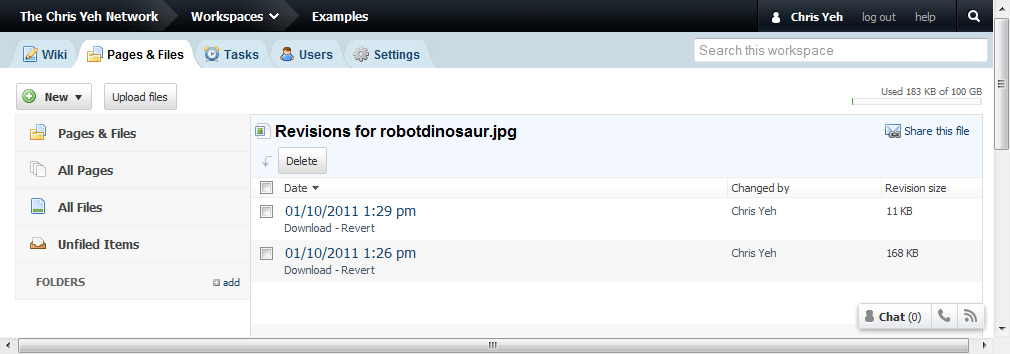
You can always access the old version by visiting the File History for that file:

Image cropping is available to all PBworks users of all product editions, paid and free.

Network Upgrade Window, Jan 5th 8-10 PM Pacific

Tonight, we’ll be upgrading our datacenter’s network connection to improve overall performance.  We expect the service to be unavailable for up to 20 minutes, sometime between 8-10 PM Pacific on January 5th, (11 PM-1 AM Eastern; 4-6 AM GMT/UTC on January 6).

Many customers will find PBworks even faster than before, especially for users who have fast Internet connections and re performing large file uploads and downloads.

Publish PBworks Pages As Printable PDFs

One of the most popular feature requests we’ve received over the years is the ability to convert a PBworks wiki page into a PDF.

One of the most common complaints we’ve received over the years is that the printable version of a PBworks wiki page doesn’t look that much like the on-screen version.

Today, we killed two birds with one stone by releasing the ability to convert any PBworks wiki page into a printable PDF.  This replaces the old “Printable version” with a more attractive PDF, which you can either print or download and share.

The “PDF version” is available at the bottom of every page, and to every PBworks user, paid or free.

Thanks for your suggestions, and helping us make PBworks an even better service!