New Feature: Copy Page

One of the actions I’ve often found myself taking in PBworks is manually creating a copy of a wiki page.

For example, I use PBworks to record meeting notes for recurring meetings.  At the end of each meeting, I would have to remember to do the following:

  1. Enter Edit mode
  2. Click “Source” to enter Source mode
  3. Select all and copy the source HTML
  4. Click “Cancel” to go back to View mode
  5. Click the “Create a page” link to start the create page process
  6. Type in a page name and click the “Create page” button
  7. Click “Source” to enter Source mode
  8. Paste the source HTML I copied back in Step 3
  9. Click “Save”

Now I got pretty good at doing this quickly, but the fact is, I had to go through *NINE STEPS* to simply copy a page.

With the new “Copy this page” feature, we’ve reduced this to two steps:

  1. Click “Copy this page”
  2. Name the copy and click the “Copy” button

Those two steps do everything that the previous nine steps did; they copy the exact page contents, including links and plugins, but not including comments or page revision, and they place the copy in the same folder as the original page.

In fact, “Copy this page” even goes one better, by copying security settings and tags as well.

“Copy this page” is available to all our users, free and paid.  For more details on how to use “Copy this page”, you can check out our user manual:

Free/Educational Users: http://usermanual.pbworks.com/Copy-this-page

Business Users: http://docs.pbworks.com/Copy-this-page

PBworks is hiring!

Hello, all you PBworksians!  Have you ever wanted to be part of the incredible team here that is changing the way people work?  If you or anyone you know would like to be our new Cluster Operations Manager, please email us today!  The full posting is in our job section, but here’s the run down: PBworks runs dozens of servers to keep your workspaces humming.  The new hire will tend to those servers and the software they run like a patient gardener, taking care of weeds as the spring up, cultivating new plants as our company continues to grow.

Cluster operations is a unique job: a combination of fast paced problem solving, and taking thoughtful, proactive steps to make sure emergencies don’t happen.  Like Bender learned in his trip through space, “When you do things right, people won’t be sure you’ve done anything at all.”

Learn more and apply today!

Introducing Additive Security

As paid users know, PBworks has a very flexible security system.  Using custom page- or folder-level security, you can specify exactly who can view or edit a page, down to the individual user.

However, until now, there has been one downside to applying Custom Security settings.  These security settings have been exclusive.  That is, once you specified Custom Security, only those people you explicitly added would have access to the page or folder.

This is fine for many uses, but it is difficult when you want to expose a particular page to a particular user without affecting how other people access the page.

Here’s an example: Let’s say I’m working on a new case study.  When I’ve written the content, I want the customer who is the subject of the case study, Jane, to be able to review the page and make her edits.

Under the classic Custom Security system, I could set up Jane as a page-level only user and then add her to the case study page.  However, this would also prevent any non-admins from viewing the case study, cutting off folks like Alexis and Sam from the PR team.  To maintain Alexis and Sam’s access, I’d either have to explicitly add them as users, or make them workspace administrators.

Adding them as users under Custom Security is a hassle, and making them administrators may not necessarily be appropriate or viable.

Enter Additive Security.  Now, when you set up Custom Security on a page or folder, you can add Jane as a user without changing anyone else’s ability to access the page.

Plus, you can always use “Who can see this?” to see an explicit list of everyone who has access to the page or folder.

Additive Security makes it even easier to use PBworks to collaborate with people outside your organization.  For more details and illustrated instructions, check out our user manual:

IE6 Support Going Away November 15, 2010

Dearly Beloved, we are gathered here today not to praise IE6 but to bury it.

Microsoft released Internet Explorer 6 on August 27, 2001, almost exactly nine years ago. Since then, it has been superceded by not just one but two separate versions, and IE9 is near release. IE6 has at least 23 unpatched, serious security holes in it – Microsoft has no plans to correct any of these and these holes may have resulted in serious security breaches at Google reported in early 2010.

Furthermore, IE6’s old age means it lacks support for many of the features that make it easy to develop powerful and sophisticated web applications – this means that when we release a new version (which we do twice a week) we need to do extra work to get PBworks to function correctly with IE6. Now that IE6 usage is finally (well) below 5% of our userbase, we’ve decided to formally retire our support on November 15, 2010.

On September 15, 2010, all IE6 users visiting our site will receive an in-product message alerting them that they have two months to upgrade to a more modern browser. We strongly recommend Google Chrome 5+, Safari 5, or Firefox 3.6 for cool features like drag and drop file uploading, although we do also support IE7 and IE8. Opera users – yes, we make a best effort to work well!

On November 15, 2010, all IE6 users will be redirected to our mobile site; this will ensure that they are still able to consistently and correctly access their data but to use our more advanced technology, users will need to upgrade per the above.

New Feature: User Groups

We’ve just released User Groups, a major enhancement to how our business customers can manage user accounts.

User groups make it easier to manage workspace membership and page/folder-level permissions. Each user can be added to multiple groups on your network. Like a regular user, you can add the entire group to a workspace, and grant specific permissions to each group:

Adding a User Group

When you add a group, each person in that group will be automatically added as well.  When you add a new user to a group, that user gets access to everything to which the group has been given access.  When you remove a user from a group, they lose access, unless they have otherwise been granted access.

User groups are especially useful if you need to grant fine-grained access to a specific group of people, such as the members of a department within your organization, or a client team.

Only a Network Administrator can create user groups, so if you need a new user group on your network, contact one of your Network Administrators.

If you’re a Network Administrator, check out the Group Management page in the user manual for instructions on how to create, rename, delete, and manage your user groups.

As your organization’s use of PBworks continues to grow, user groups can help you manage the increasing number of users.  For more details on user groups, visit the User Groups page in our user manual.

Don't Just Manage Customers, Collaborate With Them

Who among us hasn’t dealt with CRM (Customer Relationship Management) software?

Whenever you call up your credit card company, it’s the CRM system in the background that the overseas customer service rep is reading from.

Whenever the phone company calls you with a new offer, the CRM system is logging the call.

But curiously enough, while CRM software is supposed to *manage* the customer relationship, it doesn’t actually touch the customer.

And after your calls with your credit card and phone company, do you feel satisfied?  Or do you feel managed?

This isn’t to say that CRM is unnecessary–just imagine if those customer service representatives didn’t know your account balance or customer history when you called!  And CRM has become so important that CRM sales are measured in the billions ($14 billion in 2007).

But it is true that CRM is necessary, but not sufficient.

Here at PBworks, we’re working to extend the CRM metaphor to encompass customer collaboration as well as “management.”

Especially for customers like advertising agencies, the customer relationship is a complex, high-value, long-term affair.  It’s hard to capture it as a row in a database.  Much of the relationship has been unwritten and personal.  But with the continual change and personnel turnover that is now endemic in business, that’s no longer enough.

The solution we’ve developed in conjunction with our customers is to use PBworks as a persistent environment for collaborating with their customers.

Rather than relying on email and telephone, our customers can create a workspace for each client or client project, use it as the central hub for communications, content, and coordination, and build some long-term relationship infrastructure that doesn’t depend solely on the personal relationships of the people involved.

The new Customer Relationship Edition (CRE) that we launched today includes additional features that enhance PBworks for this use case, including the ability to track your top prospects and customers, and receive instant alerts whenever they log in, including updates on what content they’ve read or downloaded.

The CRE enhances CRM and makes it truly collaborative–something anyone who has sat on the phone with their credit card company will appreciate.

For more information on the Customer Relationship Edition, visit our website.

You can also sign up for a free Webinar introducing the CRE on Tuesday, August 10.

To request a one-on-one demo of the product, fill out this form.

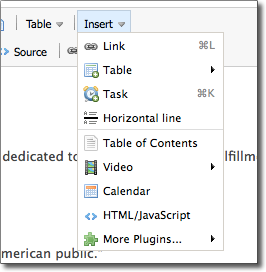
Changes to the Toolbar – New Insert Menu

This week we simplified the toolbar and made changes to they way you can add plugins, horizontal lines and tasks.

Now instead of surfing through a confusing menu of plugin options (hey, what’s a plugin!), you can now quickly chose from the most highly used options. Additionally, for Business Edition users, we’ve now made it super easy for you to insert tasks on your workspace pages.

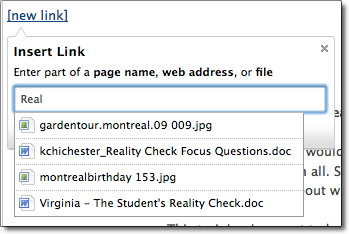
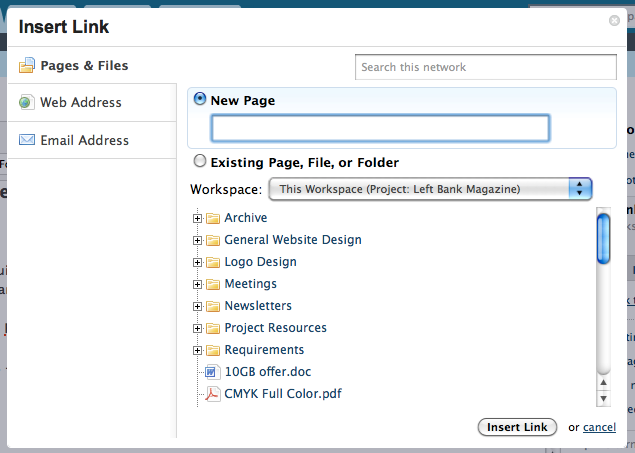
We’re also introducing a new way to add links on your workspace pages. You no longer have to chose what your linking to (URL, wiki page, file), instead just begin to type and PBworks will offer a list of existing  pages and files on your workspace.

For Business Edition users, you can now easily link between multiple workspaces.

Tell us what you think of these changes, leave a comment!

New Feature: Drag and Drop File Uploads

PBworks is excited to be the first online editor capable of instant drag and drop file upload and image insertion.  Now you can choose any file from your desktop and drag it into PBworks for instant upload. This feature only works on the latest version Firefox, Chrome and Safari.

Drag files from your desktop to the pages and files section of your workspace.  Your files will be automatically uploaded to your workspace.

You can also instantly upload files while your in edit mode.  While you’re editing, drag any file to your page.  Your files will be uploaded and inserted in your page.

Watch this short video to learn more:

http://vimeo.com/moogaloop.swf?clip_id=12957144&server=vimeo.com&show_title=0&show_byline=0&show_portrait=0&color=ffffff&fullscreen=1

Third Annual Summer Camp- Limited Enrollment

06/14/10 – Camp is closed!

—————–

It’s time for the 3rd annual PBworks Summer Camp —  the ultimate way for educators to learn how to use wikis in their school. Summer Camp participants will learn the ins and outs of using PBworks, including how to build a secure student-led site, the best way to integrate wikis with existing lesson plans and using interactive media to engage your audience.

This free training program will last four weeks from June 21nd to July 20st 2010. Camp is run by PBworks with help from experienced mentors from all over the world who support campers and share tips along the way.

Each week there will be a specific lesson on how to use your wiki. You will receive an email every Monday with a video, a lesson,  and with links to the homework, examples and more. Campers must review the video, do your homework and meet with us on Tuesday or Wednesday for a virtual presentation.

At the end of the session, Campers who have followed the program receive a free premium classroom wiki for the school year and valuable lessons along the way!

100,000 Support Requests & Improvements

After a flurry of large projects – user groups, nested folders, and whole new editor – we’ve spent some time making sure these features worked really well. This included reviewing feedback and making a lot of small changes. Here are some changes that you asked for and we delivered.

Collapsible nested folders – When we released nested folders, each folder still showed up under “Pages & Files”.  Now you can collapse folders, so you only view the top level folders.

Images using the new editor: Images now have the option to add padding. Right click on an image, choose properties to add space around your image and text.

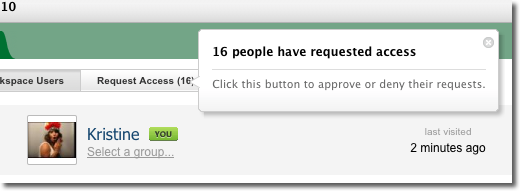
User panel – Now when someone requests access to your workspace, you are notified with a help bubble.

In other news, our PBworks support team received their 100,000th support ticket from Brandy C. This is what it looked like:

Subject: I have feedback about Nested Folders.

Yea!! This is GREAT! One of the frustrating features was the inability to nest folders! Now I can create folders for different levels/ classes and then nest folders for each project! Thank You!

We love feedback! Please continue to let us know what you want to see, and we’ll try our best to make it happen.