Introducing Image Cropping

One popular feature in PBworks is the ability to embed images on wiki pages.  But what happens if you you only want to show part of an image?  This is pretty common, and most people don’t feel comfortable using tools like Photoshop to modify their images.

That’s why we’ve added the ability to “crop” images to PBworks.  Once you’ve uploaded your image, you can use PBworks to trim away the portions of the image you consider unnecessary.

Here’s how it works:

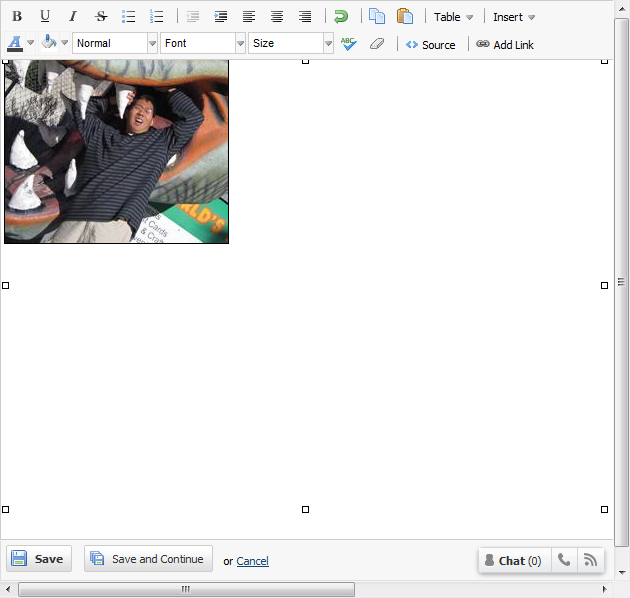
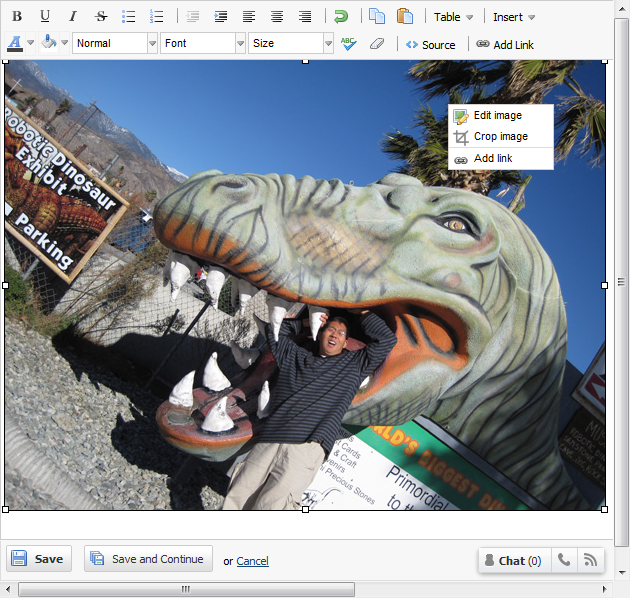
Once you add an image to a wiki page in “Edit” mode, right click and select “Crop Image”

This should bring up a special cropping window where you can drag the cropping selection until you’ve highlighted the part of the image you want to save:

When you click “Crop and Save,” PBworks will crop the image and save the trimmed down image as a new version and return you to the standard Edit window:

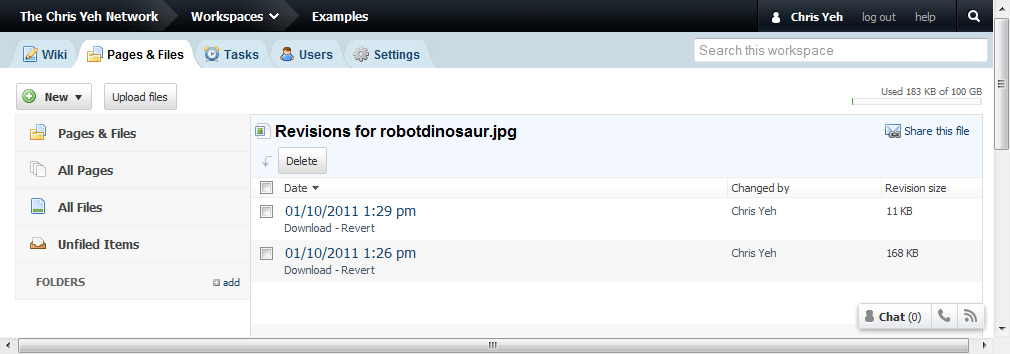
You can always access the old version by visiting the File History for that file:

Image cropping is available to all PBworks users of all product editions, paid and free.

Network Upgrade Window, Jan 5th 8-10 PM Pacific

Tonight, we’ll be upgrading our datacenter’s network connection to improve overall performance.  We expect the service to be unavailable for up to 20 minutes, sometime between 8-10 PM Pacific on January 5th, (11 PM-1 AM Eastern; 4-6 AM GMT/UTC on January 6).

Many customers will find PBworks even faster than before, especially for users who have fast Internet connections and re performing large file uploads and downloads.

Publish PBworks Pages As Printable PDFs

One of the most popular feature requests we’ve received over the years is the ability to convert a PBworks wiki page into a PDF.

One of the most common complaints we’ve received over the years is that the printable version of a PBworks wiki page doesn’t look that much like the on-screen version.

Today, we killed two birds with one stone by releasing the ability to convert any PBworks wiki page into a printable PDF.  This replaces the old “Printable version” with a more attractive PDF, which you can either print or download and share.

The “PDF version” is available at the bottom of every page, and to every PBworks user, paid or free.

Thanks for your suggestions, and helping us make PBworks an even better service!

New: Edit Summaries

PBworks has been around since 2005, and during that time one of questions that keeps coming up is “Why don’t you have wiki edit summaries like Wikipedia?”

Partly, it was a matter of friction.  We wanted to keep the interface simple, and asking people to enter an edit summary each time they hit save would introduce a lot of friction.

Partly, it was a matter of use case.  Most of the original wikis back when we were PBwiki were relatively small, and so edit summaries weren’t as crucial as for Wikipedia.

But as we’ve grown (as have our users), the second argument became less relevant.  And as for the first, we realized that we could simply make the edit summaries optional, so that folks who didn’t like them didn’t even have to see the option.

That’s why today we rolled out edit summaries to all our users.  Whenever you edit a wiki page, just click “Describe your changes” to enter your short (<2,000 characters) summary.  Your description will appear (along with all the other edit revision information) in the page history for that page.

Don’t like the “Describe your changes” box taking up room on your screen?  Just click “hide this” and the box will go away until you click the “Describe your changes link.

For more details, you can read our User Manual.

Coming Soon: Improved File Collaboration For Everyone

Just last week, we rolled out major improvements to how you can work with files in PBworks to our business customers.   We’ve gotten such a good reaction to these improvements that we’ve decided to make them available to everyone, including free users.

Starting with Release #520, everyone will be able to tag and comment on files, while premium users on Classroom and Campus Edition will be able to set file-level access permissions, just as they’ve been able to do with wiki pages and folders.

You can read up on all the details here.

Network Folders and Improved File Collaboration

We’ve done a lot of work on our business products to make it easy to create workspaces.  Whether you use one of our built-in workspace templates, a template from the Template Store, or your own custom templates, you can create a customized workspace in less than a minute.

The process is even faster with our Salesforce.com connector, which allows you to create a custom workspace, including data from Salesforce.com, without ever leaving that application.

All this hard work has generated the intended result–our business customers are creating hundreds of workspaces per network.  And once you have hundreds of workspaces, you need a better way to organize them, which allows you to group related workspaces and reflect how you run your business.

Enter Network Folders.  Much like the folders in each workspace, Network Folders let you create a hierarchy.  Network Folders create a hierarchy of workspaces, which can reflect the internal organization of your company, your clients, or both:

For example, Anderson DDB Health & Lifestyle creates hundreds of workspaces per year, just to manage the projects of one major client.  Network Folders let them reflect that client’s organization (35 business units, 5 geographies) within PBworks.

Learn more about working with Network Folders.

We’ve also made major improvements to the way we handle files and documents.

In PBworks, wiki pages provide a lot of functionality beyond simple viewing and editing.  You can comment on a page, providing another way to collaborate outside the main page content.  You can tag a page, making it easier to find when you search for it.  You can even set custom security settings on a per-page basis.

Now we’ve brought that same level of collaboration to files and documents.  While you can still simply focus on uploading, downloading, and sharing files, you can now comment, tag, or secure individual files, just like you can with individual wiki pages.

This can be especially helpful if you’re gathering feedback on a file, either internally or from a client.  Now you can upload that new logo design, share it with your client, and get notified when that client provides his or her comments.

Learn more about working with files.

Both Network Folders and the improved file collaboration are available on our paid business products.
Introducing PBworks Agency Edition

Here at PBworks, we’re focused on solving specific business problems for specific markets.  We believe that’s the best way to deliver value for our customers.  That’s why we’ve created specific products for educators, law firms, and CRM.  And that’s why we’ve just launched PBworks Agency Edition.

Over the past year, we’ve had the good fortune to work with some of the biggest names in the agency world, like Landor Associates and the BtoD Group (a part of WPP, the world’s largest advertising holding company).  As we’ve worked with them to integrate PBworks into their workflow, we’ve learned a lot about this fascinating market.

It turns out that agencies are inherently collaborative.  To get a TV commercial or print ad from idea to your living room takes an army of different people, ranging from creative directors to designers and copywriters (not to mention the client).  And historically, all this coordination was done via email and telephone.  If Mad Men were more like real life, Don would spend a lot more time herding cats…and the show would be a lot less interesting.

The industry is also undergoing some major changes that are increasing the need for collaboration.

Media fragmentation–adding digital, social, and mobile to print, TV, and radio–makes it nearly impossible for a single agency to handle all aspects of any major campaign.  As a result, cross-agency collaboration has quickly become one of *the* hot topics in the industry.

Globalization is driving a much greater need for online and asychronous tools.  Even if a major campaign gets kicked off at HQ, it needs to be localized across six continents by local offices–and no one wants to get up at 4 AM to call Hong Kong.

Rapid personnel turnover makes it ever more important to find ways to capture the knowledge of each agency’s people.  Unless their name is above the door, you can’t count on any particular person staying at their current agency.

Finally, innovation is the Holy Grail.  Consumers are jaded and cynical, and it takes bold new campaigns to break through that armor.  To get that innovation, agencies need to be able to tap the talents of their entire team via social collaboration.

We’ve taken these concerns into account, along with agency-specific needs like managing complex customer relationships, and sharing in-progress video in a more secure environment, and created PBworks Agency Edition.

Agency Edition is a beginning, not an end.  As we continue to work with our customers, we’ll continue to deliver innovative new features to meet their needs.

Here’s what other people had to say about the news:

Permissions Update: Bringing Writers Back Into the Fold(er)

For the last few years at PBworks, while building an amazing set of new technologies we’ve tried to stay true to four consistent set of tiers for access:

  • Readers cannot modify the content of a workspace in any way (though they can optionally be allowed to comment).
  • Writers can perform reversible / non-destructive operations that don’t affect workspace-wide settings or security.
  • Editors can modify and delete things on a workspace in an irreversible way but they cannot affect workspace-wide settings or security.
  • Admins can perform any operation on a workspace.

It’s become clear that when we rolled out folder manipulation that we left writers out of the party, so to speak, by not letting writers create folders. Some Administrators worked around this by making everyone Editors but were then worried about people accidentally deleting information. Madness. And since folder creation is a reversible and non-destructive operation, we realized that we ought to fix that to let writers better structure their contributions to a workspace.

So on October 26, 2010 we’ll be flipping the switch to allow writers to create folders. (It’s also my birthday that day!)

Check out our fabulous Permission Levels page for a refresher on exactly what each role can do.

Coming Soon: Network Notifications

Long ago (in the ancient days of 2009) PBworks consisted of separate and unrelated workspaces.  For business customers, this was a problem, since it was difficult to keep track of all their different workspaces and projects.

The answer was PBworks Business Edition, which introduced the concept of “networks” of related workspaces.  Now, business users could easily navigate between their various workspaces, and see aggregate information on a personal dashboard.

However, there was one area in which workspaces remained stubbornly separated: email notifications.

For the past 18 months, our Business Edition users have continued to receive separate notifications for each of their workspaces.

This is going to change.

Based on your feedback, PBworks will soon be releasing Network Notifications.  Like our Dashboard, these new notifications will aggregate the information from all your workspaces and present it in one convenient place, this time in your email client rather than your web browser.

The new Network Notifications should reduce the amount of email you get from us, but still keep you up to date on all the important items you don’t want to miss.

We’ll be turning on Network Notifications for everyone in the next few weeks, but if you want to experience them early, contact your Account Manager, and we’ll try to work you into the beta testing program.