Join Alpha Team: Inside look at PBwiki


Image from http://www.collider.com/

The A-Team is a group of outspoken PBwiki experts who test out all of our newest features and let us know what they think. This year we’re looking for a few more people to join the team.

This is a great chance for you to look under the hood at what we’re developing at PBwiki and affect the way it works.

This offer is not for the meek or faint of heart! You’ll be swimming in uncharted waters, trying out brand new features as we develop them. Things might change drastically, or maybe there will be bugs. We count on our Alpha Testers being there to help us find problems that we don’t see here, on our own computers.

If you’re an experienced PBwiki user who wants to test out the latest features and tell us what you think, sign up for the PBwiki Alpha Team.

Join the PBwiki A-team

PBwiki in read-only mode – Engineers are working to fix this

01/27/09 3:06 PST
Hi everyone,

Some folks are experiencing read-only access and aren’t able to edit their wiki pages. Our engineers are aware of the problem and working on it.

Your data is safe and should be accessible asap. For up to the minute details, you can follow our updates on twitter at @PBkrissy

-Kristine

01/27/09 3:30PST
Hi again,

Your wiki and all of your data is once again accessible – both to view and edit. We tracked down and fixed a problem that was causing an infinite loop in our servers.

We’re sorry to have experienced slight downtime during your work day.

– Kristine

Official Timetable for Updating from PBwiki 1.0 to PBwiki 2.0

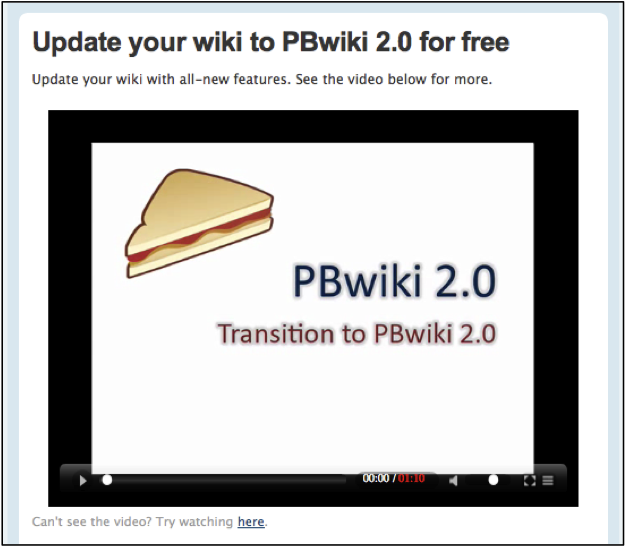
If you’re still on a PBwiki 1.0 wiki, you’ve probably received an email recently about updating to PBwiki 2.0. Beginning on March 9th, 2009, all 1.0 wikis will automatically update to 2.0.

Don’t worry — you have plenty of time to make the change (a free update, which takes less than 5 minutes), plus we’ve got an excellent support team waiting to help you.

When we launched PBwiki in 2005, we designed our system to be easy to edit and share. Now, 4 years later, our users have taught us a lot. You’ve told us that you want more control over users, more powerful editing/sharing features, and an improved user interface.

In 2008, we rolled out PBwiki 2.0 to address those needs. A year later, we’ve concluded that for just about every usage, PBwiki 2.0 works better than 1.0 for collaborating and sharing information. 2.0 even gives you new features like Classroom Accounts (which allow educators to invite students without email addresses) and Document Management.

Updating to 2.0 does mean learning a different user interface, but the folks who’ve made the switch will tell you it’s worth it:

Finally upgraded my pbwiki site to 2.0. why did i wait so long to do this! wow! – starryhope01

I have used PBwiki for 2 graduate courses with the same students. All of us like the PBwiki 2.0 over the earlier version. This version feels more intuitive and allows me to break the class into groups with their own work areas (folders). -Jane Allgood, Ph.D.

You can use a simple wizard to update to 2.0 (again, it’s free and takes about 5 minutes). You will not lose any content by updating to 2.0, and with Classroom Accounts (which replace invite keys), reader comments, folders, easier editing, full CSS customization, and so on, PBwiki 2.0 allows you to do just pretty much everything you could with PBwiki 1.0 and more.

You can update to 2.0 at any time, or you can wait until March 9th, and we’ll update for you.

To update to PBwiki 2.0, go to WIKINAME.pbworks.com/migration.php (just replace WIKINAME with the name of your wiki) and follow the instructions on screen!

New Feature: Even more customization for your wiki pages (premium feature)

Today we’re excited to announce an even easier way to customize your PBwiki pages.

In the past if you wanted to remove static elements from the page – like the comment box or the sidebar – you had to use custom CSS. This was a pain for many reasons – you had to know CSS, even then your CSS code might not work in all browsers and it was hard to create default settings for your page.

Our new customization settings makes it super easy to design your wiki pages – and you don’t need custom CSS. Now you can:

  • Display your comments in reverse chronological order or remove the comment box entirely.
  • Remove header, footer and contact forms from your wiki.
  • Chose what elements are available on the side panel – remove the sidebar, folders and recent wiki activity.


Note: If you remove the comment box, existing comments will be saved but not visible on the page.

To add custom settings to your wiki, go to Settings —> Advanced Settings —> Customization. This feature is available on all premium wikis.

Feedback?
We love feedback! Let us know how you will customize your wiki!

PBwiki presenter pack – free materials (plus three wikis!)

Do you present about technology and show others how to use a wiki?

We want to say thanks for spreading the word!

For you thousands of presenters, we’ve developed materials that make your job easier – the PBwiki Presenter Pack. This is a free virtual presentation guide that include videos, how-to guides, a free tee-shirt AND three free premium wikis!

Who can apply for a PBwiki Presenter Pack? This program is designed specifically for educators, instructional technologists, and folks in the non-profit field.

Already over 2,000 people have applied for and received their free wikis. If you’re presenting at an upcoming conference, or just showing a group of co-workers how to use a wiki, you can apply for the PBwiki presenter pack.

Apply for your presenter pack today!

Slow page loads — Our engineers are responding

12/31/08, 7pm PST: Some wikis are experiencing slow page loads and 500 errors when wiki pages attempt to load. Our engineers are aware of the problem and working on it.

There is no data loss and we estimate a relatively quick repair of the problem. We apologize for the inconvenience and wish you a Happy New Year’s! We’ll keep you updated here.

7:03pm: Our engineers have put a fix in place to repair most of the problems. We’re continuing to monitor page loads, but anticipate that most operations work smoothly again. Have a happy holiday!

New Feature: Now readers can comment on wiki pages

This week we’re excited to release one of our most requested features – Reader Commenting. Before,wiki users with ‘Reader’ access were only allowed to view your wiki.

Now, you can enable Readers to leave comments.

Why reader comments are useful

The ability for readers to leave comments is great if you like to get input from everyone in your organization, but you don’t want to give them full access to edit other pages on your wiki.

Reader comments are also useful for classrooms. Teachers can post questions on a page and have students answer them without having the ability to edit the questions.

How we keep your wiki safe with Reader commenting

Note: To keep your wiki safe, only users who have been invited as readers are enabled to comment. Visitors to public wikis won’t be able to leave comments unless they’re added to the wiki as readers

If you already have a wiki, you’ll need to enable this feature by doing this: Go to Settings —> Wiki Security —> Uncheck the ‘Disable reader commenting’ box.

New wikis will have Reader Commenting enabled by default.

How are you going to use reader commenting? Tell us in the comments!

New feature: Extend your wiki with embeddable HTML / JavaScript

You can already easily insert YouTube videos and Google Gadgets into your wiki using the Plugin menu (click Edit >> Insert plugin).

Now, we’ve made it easier to extend your wiki by inserting HTML and JavaScript into your wiki.

Use HTML/JavaScript to add outside widgets to your wiki

Custom HTML/JavaScript allows you (or your admins) to add interactive elements — also known as widgets — to your wiki pages.

Examples:

  • Forms you create from Wufoo
  • Slideshows from Flickr
  • Any other widget with embeddable code!

Included: Security options for administrators

Widgets can sometimes result in unexpected behavior, so we’ve included built-in security for this feature (learn more about PBwiki security).

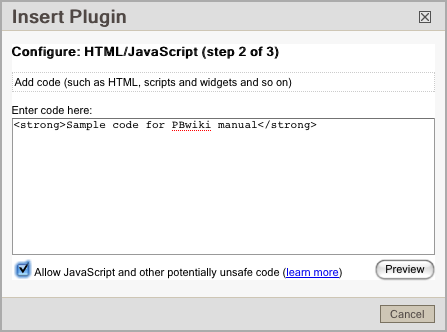
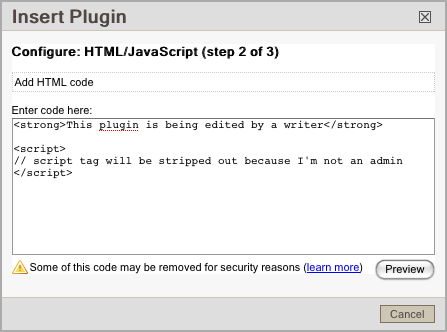
If “Allow JavaScript and other potentially unsafe code” is checked, only wiki admins will be able to edit the plugin in the future.

When other wiki users edit the plugin, they will not see the checkbox. If potentially unsafe code is detected, a warning will be shown. Potentially unsafe code, such as JavaScript, is automatically removed from the plugin to help keep your wiki safe.

To use the HTML/JavaScript plugin

1. Go into edit mode on your wiki by clicking the “Edit” tab.
2. Click the “Insert Plugin” button
3. Choose “PBwiki Magic”
4. And then choose “HTML/JavaScript”
5. Type in your code
6. If you’re a wiki administrator and want to include JavaScript (“script”) or CSS (“style”), check “Allow JavaScript and other potentially unsafe code”
7. Click “Preview,” then “OK,” and now “Save” your wiki page.

And if you have any questions, please check out the PBwiki Manual on Custom HTML / Javascript.

Tip of the week: Restrict access to your documents

Since we released the new document management features we’ve seen a huge spike in the number of files that people upload to their wiki.

Now people want to know how to set custom security on these files – specifically how to share a document with just a few users but not everyone on the wiki.

Here is a question straight from the support queue:

“It seems that everyone on my wiki can click on the files button and see all the files. Is there a way to prevent this? I have files that I do not want other departments to see.”

YES! On premium wikis, administrators can create custom security settings for their documents and files.

To restrict access to files and documents on your wiki:

  1. First create a folder and set custom security on that folder.
  2. Next upload your files into that folder.

http://vimeo.com/moogaloop.swf?clip_id=2559226&server=vimeo.com&show_title=1&show_byline=1&show_portrait=0&color=00ADEF&fullscreen=1
Restrict Access from PBwikiWebinars on Vimeo.

What do you use for your playbook?

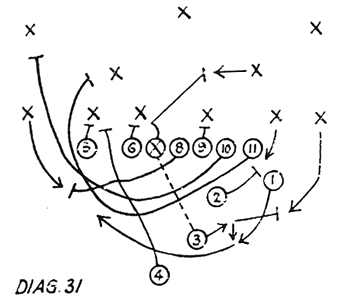
Image from directsnapfootball.com

I spent most of Sunday afternoon at home watching various football games. While I’m a fan of all sports, I’m always amazed at the execution and synchronization of a typical football play. Each down, the 11 players move in perfect harmony in order to reach their goal. The slightest misstep can be the difference between victory and defeat.

What is true on the football field is often true in real life: if a team isn’t on the same page, the team is likely to fail. Football players spend hours reading a playbook and practicing over and over again in order to attain this togetherness. In the business world, we don’t have time to practice for hours which makes having a good playbook essential. If your team doesn’t have a playbook, why not build one today using a wiki?