How PBwiki Made My Life Easier

As the new guy at PBwiki, folks often ask me about why I wanted to join the company. (thankfully, not too many ask the logical corollary, “Why would PBwiki want you as an employee?”)

Besides the people here, who are great, the biggest reason for me is that I really love the product. Even more importantly, I love what it does for my life.

PBwiki really is my external brain. I use it to keep track of everything in my life.

For example, for my work, I use the company wiki to keep track of all my work.

After every meeting I attend, the first thing I do is to create a new wiki page and enter my notes. That way, everyone in the company has the chance to see them, and to edit and add to them. It’s a great way of keeping everyone up to date.

A couple of weeks ago, David actually came over to my desk after I saved my latest batch of notes, because he had also been working on a similar issue, and when the notification came through, he realized that it was a perfect time for us to get together and work on things together. Without PBwiki, it might have been days or weeks before we synched up.

The next step is to take any action items or tasks and add them to my Job Page (you can find the template I use for my Job Page on the Transparency Project wiki). This way, everyone can see what I’ve put on my plate, and they know who to follow-up with if I don’t make timely progress.

I’m convinced that these simple actions save me hours of time every week, simply because I don’t have to spend time thinking, “What did we talk about,” and “What should I do now?”

Naturally, one of the daily/weekly ongoing tasks I have on my job page is to post to this blog each Thursday.

I’d love to hear how you are using PBwiki to save time or become more productive, either in your personal life, or at work. I’ll try to share some of the best stories in future posts, both because I think it’s cool to highlight what people have done, and because it may help other readers figure out new ways that they too can make their lives easier with PBwiki.

–Chris (The New Guy) Yeh
PBwiki 2.0 Preview: Folders

[See our past Previews of PBwiki 2.0: Page-level access and Overview.]

Organizing your wiki becomes important as you add more and more content. In PBwiki 2.0, we’ve improved navigation with better search, improved tagging, and page folders.

Today, I’m going to cover page folders in PBwiki 2.0.

When it comes to PBwiki organization, there are a couple of major issues:
1. Organizing lots of pages is difficult on PBwiki right now (have you ever wondered, ‘Where did that page go?’)
2. There are often many different users on a wiki — and they don’t care about all pages, they just care about their pages

As a result, we’ve created folders within PBwiki 2.0.

Imagine you invite your colleague from your marketing team to your PBwiki. Wouldn’t it be great if there were a central place — within the wiki — for all the marketing pages?

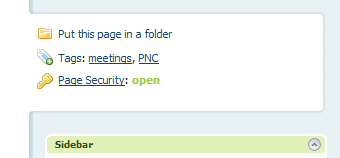
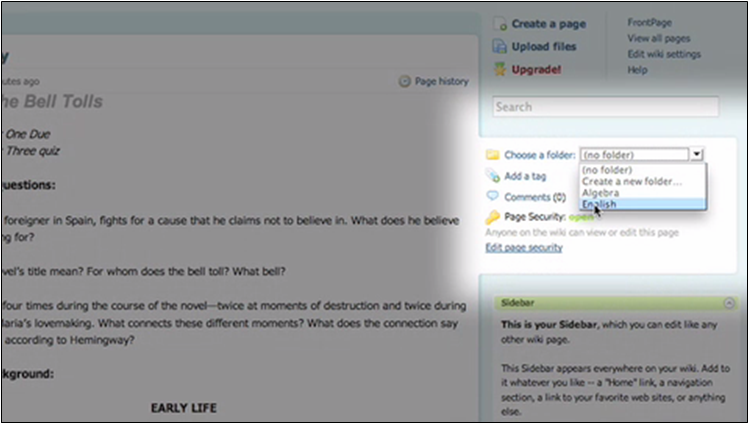
In PBwiki 2.0, you can add any page to a folder. (Use an existing folder or create your own.)

add-page-to-folder.png

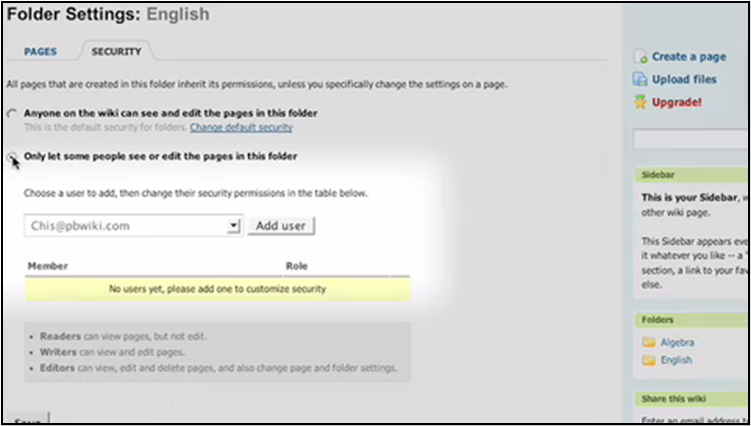
And just as PBwiki 2.0 features page-level access, it also features folder-level permissions.

folder-settings-add-user.png

Folders are useful for:

  • Creating specific sections on your wiki to organize pages
  • Creating specific sections on your wiki with custom permissions
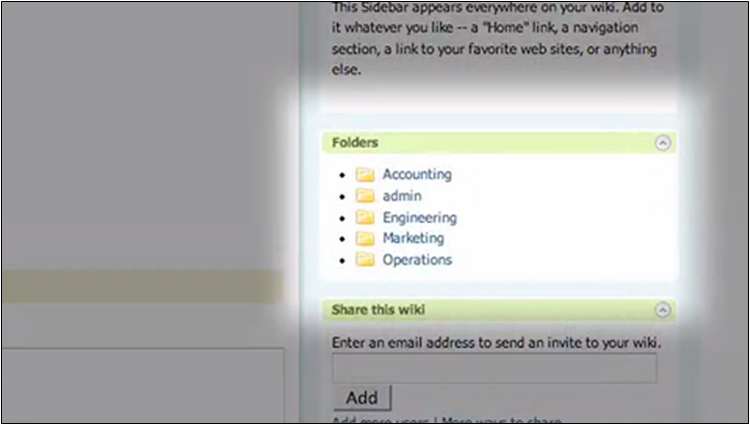
  • Making your wiki easier to navigate!

navigate-by-using-folders.png

Golden Tickets: Get beta access to PBwiki 2.0
We have a limited amount of Golden Tickets to try out PBwiki 2.0 as a beta user. If you’re interested in trying out PBwiki 2.0 and giving us feedback, sign up for PBwiki 2.0 beta access.

How to spot your next (support) hire

We just added two more folks to our support team (Welcome, Casey and Rachel!) and I wanted to talk about the choices we made along the way. We could hire support folks to do one of two things: 

  • Do their job and go home.
  • Do their job exceptionally well, make customers love PBwiki even more and then go home.

PBwiki’s support team chose the latter – here’s what I look for:

  • Do we get excited thinking about bringing this person on board?

If there’s any doubt – move on. We need superstars to rub off positively on the rest of our superstars.

  • Are they capable of doing exceptionally well at their job?

How passionate are they about what they do? How good do you think they can become? If both of these questions look good, you’ve got a great hire on your hands.

  • How much hand holding will they need?

We need people with initiative – otherwise, constantly making sure they’ve done the right thing is going to eat up all of my time.

  • Do they share PBwiki’s core values?

If they don’t, we risk losing PBwiki’s identity and becoming Boring Company, Inc. Test this by letting them support a handful of customers and watching the customer response – you’ll have your answer in short order. 

Will this get you the right candidates 100% of the time? Perhaps not – but it will significantly boost your chances of finding the right people along the away. 

PBwiki 2.0 Preview: Page-level permissions

[See our past Previews of PBwiki 2.0: Overview]

We’ve received hundreds of notes from users who want to control access to specific pages on their wikis. We’re happy to announce that PBwiki 2.0 will include page-level access. Today we’re taking you on a preview tour of how page-level access controls will work.

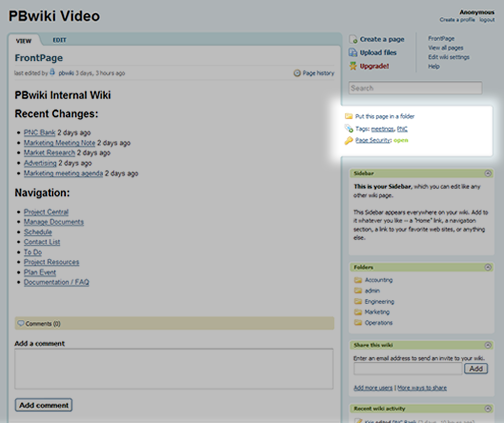
In PBwiki 2.0, each page has a tab with relevant information, including “Page security.”
page.png

A closer view
page-1-thumb.gif

By default, pages have the same security settings as the rest of your wiki (if your wiki is private, your pages will be private).
page-2-thumb.gif

New! Administrators can override default security and choose who has access to specific pages.
page-3-thumb.gif

Here, you select from a list of your wiki’s users and assign them the appropriate level of access. Note that we’ve slightly changed the levels of access to “Reader,” “Writer,” and “Editor.” (We’ll cover our new individual logins in an upcoming preview post.)

Why is this useful?
When we started PBwiki, we didn’t see the need for detailed access controls. But as we’ve grown, we’ve been hearing from users who want controls over who can access specific pages. Sometimes they want to add access, like inviting someone outside the company to one specific page (without exposing the rest of the wiki). Other times, they want to restrict access, such as preventing engineers from seeing marketing plans and having a premature heart attack.

By adding page-level access, you can control exactly who sees your content. This feature will be released in some limited fashion for free users.

Examples of using page-level access

  • A private business wiki. If you use a private wiki for business purposes, imagine managing your external vendors on your PBwiki. Create a page for each vendor and grant them access to that page only.
  • An educational wiki. If you’re running a classroom PBwiki, you may want to limit certain students to certain pages. Take your syllabus, for example — it may be different for your 3rd-period and 6th-period English classes. Use page-level access to restrict students to their appropriate page. Or create a page for each student and let them upload their homework directly to the page.
  • A personal wiki. I have a private wiki with various projects, and I’d love to be able to invite others to participate. But until now, I couldn’t, because they’d be able to see private information I have (like account numbers and passwords). Now, using page-level access, I can create specific pages and invite outside people to have access to that page only.

Coming up: More previews
Stay tuned for more previews on new features like individual logins and folders.

Golden Tickets: Get beta access to PBwiki 2.0
We have a limited amount of Golden Tickets to try out PBwiki 2.0 as a beta user. If you’re interested in trying out PBwiki 2.0 and giving us feedback, sign up for PBwiki 2.0 beta access.

Are you our next support guru?

Do you like helping people figure things out? PBwiki is looking for a few part-time customer service superstars to join our support team. You’ll be on the ‘front lines’ via email, phones and the forums – our customers will rely on you to handle their questions, concerns and feedback. You’ll be working with us from our San Mateo, CA office.

Read more about the position (and apply) here.


Preview: Totally new PBwiki interface, features

This is the first preview of a major release we’re working on for early January 2008.

We’re working on a completely new interface with brand-new features:

  • New editor. We’ve improved the editor to be more responsive and have fixed a number of bugs. (My personal favorite: Bullet-pointing is now much, much easier.)
  • Page-level access. If you’ve ever wanted to allow certain people access to specific pages on your wiki, now you’ll be able to.
  • Page folders & folder access controls. This new feature will allow you to put pages in folders to better organize your wiki. A godsend for large wikis!
  • Improved logins. A few months ago, we noted how logins on PBwiki are more confusing than they need to be. In the new release, we’ll be improving logins and making it easier to track who’s doing what — and to make sharing easier.

Beginning in early 2008, we’ll be sending you information about how to migrate over to the new interface. (If you don’t want to change, you can keep your current interface.)

Here’s a preview screenshot.

ng3-layout.png

Golden Tickets: Get beta access to PBwiki 2.0
We have a limited amount of Golden Tickets to try out PBwiki 2.0 as a beta user. If you’re interested in trying out PBwiki 2.0 and giving us feedback, sign up for PBwiki 2.0 beta access.

We’re excited about the new release and will keep you updated beginning in early 2008!

Introducing Paul Singh, PBwiki's new Director of Support

We want to welcome Paul Singh, our newest member of the PBwiki family. As the Director of Support, he’ll be responsible for getting you the help and training you need from PBwiki.

Paul has an extraordinary background in Saas (software as a service) support. In the past, he’s built up a support organization for a $48 million dollar SaaS product.

What this means for you
Look for rapid improvements in PBwiki support coming up, including better training materials and answers to common questions.

Welcome, Paul!

All Pages now allows you to rename pages

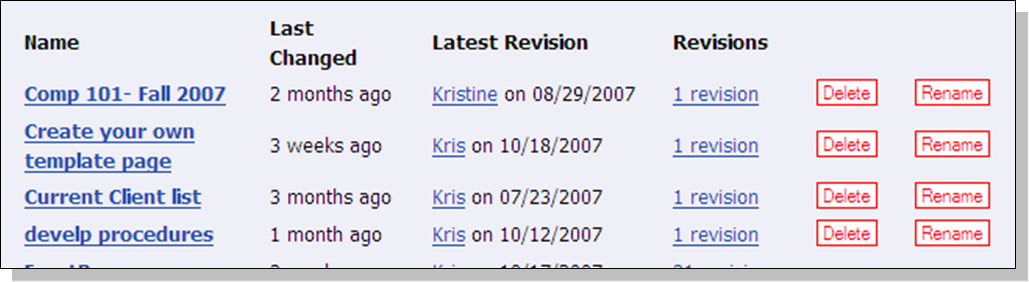
Last week we announced the improved ‘All Pages’, where you can locate all of the wiki pages that you created. After reviewing the page and listening to your feedback, we happy to bring back the ‘rename page’ option.

On the new ‘All Pages’ you are now able to delete and rename individual pages.

all-pages.png

To see the new AllPages or rename a wiki page, click “Show all pages� at the bottom of your wiki (or visit http://YOURWIKI.pbworks.com/AllPages).

Check this out — "All Pages" is now easier to use

The easiest way to find all the pages in your wiki is by clicking “Show all pages” at the bottom of your wiki (the middle box).

Today, we’ve made AllPages much easier to use.

Now you can easily see how many revisions each page has and you can quickly delete unwanted pages.

1818777126_085626b6cd.jpg

To see the new AllPages, click “Show all pages” at the bottom of your wiki (or visit http://YOURWIKI.pbworks.com/AllPages).

Edu Case Study — PBwiki at Bentley College

Mark Frydenberg, Bentley College
PBwiki and Camtasia – Changing the Way I Teach

College students today live in a world filled with social media and interactive technology. In my Technology Intensive IT 101 class at Bentley College, the question for me isn’t how do I teach students about new technologies– but rather, how do I teach with them?

Two software tools that have had the greatest impact on the way that I teach this course these days are PBWiki and Camtasia Studio. Both invite students to become involved in the process of creating course content, and sharing their knowledge with their classmates.

So how has PBWiki changed the way that I teach?

Syllabus accurately reflects class pace
The PDF file of the course schedule that I posted on BlackBoard before the first class was always “off-schedule� by the third. On a wiki, the course schedule becomes a living document that I can easily update if we end up spending more or less time than anticipated on a topic. In addition, a 30Boxes calendar posted on the front page of my PBWiki tracks homework due dates, exam dates, and other special happenings.

In addition to administrative uses, the power of the wiki as a course management tool comes when students add information to it. They post links to Internet sites and sightings; they share links to their web pages, blogs, and Twitter accounts. They use the wiki to sign up for group projects and collaborate with their partners.

Shared Class Notes
This semester I started using the class wiki for a collaborative note taking project. Two or three students are assigned to post their notes for a particular class session on a wiki page. Their classmates review the notes, adding in anything they learned that the two starting authors may have omitted. Together, the students are writing the text that reflects what they actually learned (not what I taught!) in each class session. If I feel that something important is missing from the notes, either I’ll go back and add it, or more likely, we’ll talk about it in the next class, and undoubtedly a student will have made the appropriate updates.

Students as active participants
Recently I reviewed Camtasia Studio 5, and created a screencast about how I use PBwiki for my class wiki. Watching screencasts that demonstrate procedural tasks (such as talking students through the process of setting up an FTP account, or adding an image or button to a web site) has been an effective way for students to master those tasks. Many say that when they are first learning, it is easier to follow a screencast than read a set of printed instructions. The number of students asking “Can you show me again how you did that?� has been greatly reduced.

Incorporating Camtasia and PBWiki into my classroom has allowed students to become teachers outside the classroom, as they are active participants not only in their own learning, but also in that of the entire class.

Want a guided tour of my wiki? Watch this Camtasia screencast.