Mike Bulajewski joins PBwiki as a UI engineer — welcome!

We’re thrilled to welcome Mike Bulajewski to the PBwiki family as a UI engineer:

Mike couldn’t decide if he wanted to create intuitive and beautiful designs, or write web applications that work, so he he came to PBwiki to do both. Mike brings skills in visual design, a love for intuitive interfaces, and the technical skills to bring them to life. He has worked as a freelance graphic designer, a performance engineer for Amdocs and a UI designer for Dun & Bradstreet, and holds a B.S. in Computer Science from Cal State Sacramento.

What this really means is that Mike can badmouth engineers with the marketing team, and then turn right around and mock marketing with the engineers. Clever, Mike.

Please welcome him to our team. And stay tuned for some dazzling UI changes.

(To see other job openings at PBwiki, visit our Jobs page.)

Statshot — PBwiki by the numbers

I’ve been running some internal stats on the various activity levels across the PBwiki landscape. This set of numbers breaks categories down by volume of activity rather than unique users.

How much activity on private versus public wikis?

Around 2/3 of our activity is on private wikis. Takeaway: Our users have found lots of uses for PBwiki that we don’t know about, and we’d love to hear your stories.

How much activity on free versus premium wikis?

More than 16% of user activity is on premium wikis. Takeaway: Lots of people are taking advantage of our great premium features and enhanced security. Yay!

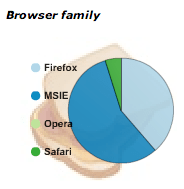
How much activity among major browser families?

Around 56% IE, 39% Firefox, 5% Safari, <1% everybody else.

How much activity over SSL versus unencrypted?

5.5% of our activity is over end-to-end SSL, which is available for our Platinum and custom SMB and business packages. Lots of companies trust PBwiki with their most sensitive documents.

Latest features roundup: Spreadsheets, voice chat, event-planning, calendars, & video upload

PBwiki has become a full-fledged platform with amazing third-party widgets that you can drop into your wikis. Here’s a demo video of how it works:

Just last week, we announced these new features.

Spreadsheets directly on your wiki (more info here)

spreadsheets81.jpg

Video upload to your wiki, or embedded from YouTube (more info here)

Event planning with the Eventbrite plugin (More info here)

Voice chat with the YackPack plugin (more info here)

Shared calendars on PBwiki (more info here) (scroll to the middle of the video)

And finally, the new beta of the PBwiki Installer, which lets you share Word documents right from MS Word. Phew.

Third-party widgetmakers and companies: We want you!
We’re now accepting submissions from third-party vendors to offer great widgets and apps for the PBwiki community. More information here.

For our users: Tell us what you want to see
We’re working to make PBwiki better and better for you. If there’s something you want to see, leave a comment here!

Welcome to our newest engineer, Jim Blomo

Jim Blomo, a friend of mine since junior high (!), joined the PBwiki team last week.

Growing up in the rough neighborhood of IRC’s #crackz, Jim escaped the shadowy life of “reverse engineering” to become classically trained at UC Berkeley’s EECS program. There he participated in all things nerdy: playing the Cal Marching Band, being a Regents’ and Chancellor’s Scholar, and moving through the ranks of Residential Computing. After graduating, he entered the wild world of ops at A9.com, running Amazon.com’s product search.

Jim Blomo

We’re thrilled to have him help us make PBwiki even better, so please welcome Jim to our team!

(To see other job openings at PBwiki, visit our Jobs page.)

PBwiki Wall Computer

PBwiki Wall ComputerSo we like to have fun here, too. You just can’t help but want to hack on neat projects with such talented engineers around, so Nathan, Brian, and I put together a computer that is attached to our wall with thumbtacks, displays hundreds of silly cats, and makes a sound whenever interesting things happen at PBwiki, like when someone upgrades. We tried having it make a sound whenever anyone edited, but the loud and continuous torrent of noises proved too much.

New feature: Plan an event using your wiki

Have you ever wanted to plan an event, coordinate RSVPs, and even sell tickets right from your wiki?

Lots of people already use their PBwikis to plan events (e.g., here and here).

Now, we’ve added a free feature to make event-planning easier. We partnered with Eventbrite, the leading online event registration service, so you can sell event tickets and collect registration information online. You can publish, promote, manage, and sell out your events with Eventbrite and PBwiki.

Watch the video below to see how easy it is to insert the Event Promoter plugin on your wiki.

(What the video says: To use the new feature, click “Edit Page”, Insert Plugin, and then hover over “Productivity” to “Plan an Event.”)

The big news: You can plan an event, coordinate RSVPs, and even sell tickets right from your wiki using the Eventbrite plugin — free.

Share Word docs with our PBwiki Installer — available now in beta

[Update, 1/30/08: We’ve put this project on hold, so please disregard the blog post below.]

We just released a super-very-much-not-final beta of the PBwiki Installer at http://install.pbworks.com.

Share Word documents through PBwiki
Want to collaborate on a Word document? Use the Installer to send files to PBwiki and collaborate with your co-workers. You can send your Word files to PBwiki in two ways:

1. In Word, just click File >> Send to PBwiki.
PBwiki Installer in Word

2. Use the dropbox to drag Word files to PBwiki. Just drag files to the dropbox and they’ll magically appear in your wiki.

PBwiki dropbox

Coming up: the ability to send documents to your wiki alone, improved notifications on your desktop, and a Mac version (depending on demand). David spent many late nights on this, so give it a shot!

Download the PBwiki Installer here.