PBwiki Presenter Pack

Over the last three months we’ve been offering our users PBwiki presenter packs. If you’re interested in giving a presentation about PBwiki (or Web 2.0 technologies in general) we’d love to ship you our presenter pack. It’s free!

The presenter pack includes:

  • A PBwiki shirt. Choose your favorite
  • An easy-to-read PDF overview of PBwiki to hand out to your audience (“What’s a wiki?” “Can I see some samples?” “What about privacy?”). We’ll even reimburse your printing costs.
  • A Powerpoint with pictures of real people/students using PBwiki.
  • 3 FREE Premium Gold wikis. Keep one for yourself and give the other two away to your audience. (Total value: $750.00.)
  • Here’s a couple of pictures of the goodies from our presenter packs, courtesy of our PBwiki users.

    wikigiveaway450.jpg

    wikigiveaway13751.jpg

    Check out our PBwiki Presenter Pack page for more information on how to obtain the presenter pack.

    Tip of the Week #10: Images, Part 2

    totw-banner.jpgJason Nguyen

    Last week, I gave you some ideas to start optimizing your images for web upload, looking at file size and compression type (JPEG or GIF). This time, we assume that you have your file created and uploaded, and we begin to explore the various ways you can present that image in a page, focusing on alignment and borders.

    This week, Oscar the Panda is on vacation, so I have Slippy here as my assistant. Say hi to Slippy!

    penguin.gif

    Continue reading “Tip of the Week #10: Images, Part 2”

    PBwiki Acquires Schtuff.com

    Sweet! You may have heard it around, but we’re super happy to welcome Schtuff.com into the PBwiki family. (For you folks who think we’re recklessly splurging, we made the acquisition with customer revenue, not our newfound VC dollars.) This acquisition brings into the fold a million new wiki enthusiasts. We’re looking forward to working with the team from JanRain (who built Schtuff) to add OpenID support to PBwiki. Here’s to the wiki space! 🙂

    Tip of the Week #9: Images, Part I

    totw-banner.jpgJason Nguyen

    Anybody who designs a website, be it a wiki or any other kind of site, will eventually come to realize that an all-text site is one of the most boring things ever, and although some of that is helped with some well-placed colors and styles, you’ll eventually need some images to spice things up.

    PBwiki makes the image upload process very easy, and the basic layout options are simple. However, before we even begin the layout process, the first step to making optimum images begins well in advance. This week, we’ll take a look at how to prep your images before you upload them, and next week, we’ll discover some neat ways to present them in your wiki.

    Continue reading “Tip of the Week #9: Images, Part I”

    Thanks for the fridge!

    Remember the part about how our huge splurge after getting the financing money was to buy a larger, but very basic, fridge?

    More than a week before it was scheduled to be delivered, I received several phone messages about someone wanting to deliver a fridge to us the following day. Needless to say, I was a bit baffled, since the vendor and delivery date were completely different than the fridge I had ordered.

    Eventually I figured out that a very nice investor at MDV had actually bought a fridge for us as a surprise, to celebrate the close of the funding round, and, therefore, we could cancel our original order. More money for ramen!

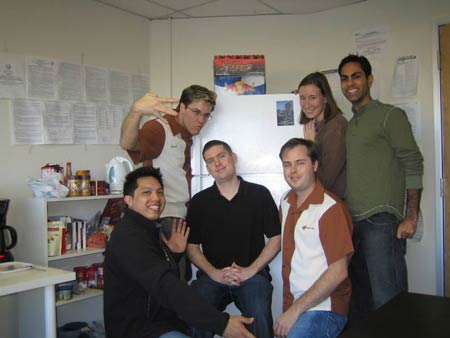
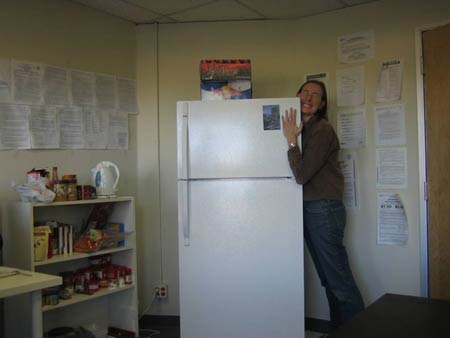
    What follows is documentation of the inside of the fridge, a group shot of the happy employees gathered ’round the fridge, and a happy employee (me) bear hugging the fridge.

    InsideFridge

    Group

    EmilyFridgeReal

    Case Study: jnthweb.pbworks.com

    Joan from JNthWeb Consulting (jnthweb) was kind enough to spend the time to participate in our most recent PBwiki case study.

    You can read her bio here (http://jnthweb.pbworks.com/MyBio).

    PBwiki: Why’d you choose PBwiki?
    Joan Vinall-Cox: I choose PBwiki because it was visually attractive. I saw a PBwiki being used by, I think it was, Chris Sessums, (who posts frequently on Elgg) and was impressed with how much cleaner and more attractive it looked than another, easier, wiki I was using. Its appearance impressed me so much, I was willing to go to the extra effort of learning some wiki write-up language – and even some HTML – to get the appearance I wanted. That point is moot now, because of PBwiki ‘s new [Point-and-Click] editor.

    PBwiki: What’s JNthWeb Consulting about?
    Joan Vinall-Cox: It’s my business website, showing my area of expertise and interest – Web2.0 and its uses for businesses and education. (I am interested in the social and communication possibilities of the computer and the web, and am limited in my technical knowledge. I’ve taught myself a little HTML and have created websites and put them online before, but using wikis allows me to avoid a lot of the onerous technical work, and still have an online presence.)

    main450.jpg

    PBwiki: How do you use your PBwiki?
    Joan Vinall-Cox: It’s a collection of information that I can point people to. For example, I send my students to the AcademicPapers page and the AttractivePages page so they know what my expectations are and how to use the computer and Web2.0 to accomplish them. I also point clients and friends to pages focused on areas they are interested in.

    PBwiki: How many people are active on your wiki?
    Joan Vinall-Cox: Just me. I want to keep it as my website, not as a shared writing/editing space. Until the new [Point-and-Click] editor, I didn’t think the people who would be drawn to my wiki, largely technophobes and/or newbies, or my students, would be interested in trying to use the more complex wiki write-up language of the previous iteration.

    PBwiki: Give us your insight on using the new Point-and-Click editor.
    Joan Vinall-Cox: I love [Point-and-Click] editors because they allow me to set up more interesting and attractive web pages myself. More importantly (and why I think the time of the wiki has arrived), the [Point-and-Click] editor allows people who aren’t technologically skilled to add to wikis. This sharing can lead to the organic development of learning communities, which is great in education, and will become increasingly important in business. The [Point-and-Click] editor rocks!

    PBwiki: What has been the biggest surprise for you in using PBwiki?
    Joan Vinall-Cox: I really enjoyed figuring out how to create my title by using Word and taking a screenshot, and I was excited when I figured out how to use HTML code to change font colour and size. The greater flexibility of PBwiki surprised me.

    PBwiki: Would you tell others about PBwiki?
    Joan Vinall-Cox: Yes I would, especially now that there is a [Point-and-Click] editor, and more people are beginning to understand some of the possibilities of what can be done with a wiki. I think the time of the wiki is arriving.

    PBwiki Raises $2m To Make Wikis Awesome

    Folks,

    You may have heard it through the grapevine, and it’s true! We’ve raised $2m from MDV to invest primarily in engineering to make PBwiki even friendlier and easier than it is today. We’re going to continue our principled frugality (like getting Hello Boss instead of Starbucks at a quarter the price), but hopefully we can bring some more bright minds on board. Say there, are you an elite Javascript hacker looking for a job? 🙂

    -David Weekly, CEO

    Point-and-Click editing is here!

    Note: Scroll down for the video!

    A lot of you have been asking for an easier way to edit your wiki – we’ve listened and we’ve acted – Our new Point-and-Click editor went live to all of PBwiki earlier this morning.

    What is Point-and-Click?

    Point-and-Click is our new editor that allows the collaborators of your wiki to edit pages in a familiar easy-to-use word processing interface.

    pointnclick.jpg

    One of our new features in our Point-and-Click editor is the ability to load various plug-ins such as Google Gadgets, YouTube videos, calendars, chat rooms and more.

    plugininsert.jpg

    Ramit Sethi, co-founder of PBwiki has a 90 second video on the new features of our Point-and-Click editor. Check it out here:

    So what do you think? We’re really interested in hearing what you have to say.