IE6 Support Going Away November 15, 2010

Dearly Beloved, we are gathered here today not to praise IE6 but to bury it.

Microsoft released Internet Explorer 6 on August 27, 2001, almost exactly nine years ago. Since then, it has been superceded by not just one but two separate versions, and IE9 is near release. IE6 has at least 23 unpatched, serious security holes in it – Microsoft has no plans to correct any of these and these holes may have resulted in serious security breaches at Google reported in early 2010.

Furthermore, IE6’s old age means it lacks support for many of the features that make it easy to develop powerful and sophisticated web applications – this means that when we release a new version (which we do twice a week) we need to do extra work to get PBworks to function correctly with IE6. Now that IE6 usage is finally (well) below 5% of our userbase, we’ve decided to formally retire our support on November 15, 2010.

On September 15, 2010, all IE6 users visiting our site will receive an in-product message alerting them that they have two months to upgrade to a more modern browser. We strongly recommend Google Chrome 5+, Safari 5, or Firefox 3.6 for cool features like drag and drop file uploading, although we do also support IE7 and IE8. Opera users – yes, we make a best effort to work well!

On November 15, 2010, all IE6 users will be redirected to our mobile site; this will ensure that they are still able to consistently and correctly access their data but to use our more advanced technology, users will need to upgrade per the above.

New Feature: User Groups

We’ve just released User Groups, a major enhancement to how our business customers can manage user accounts.

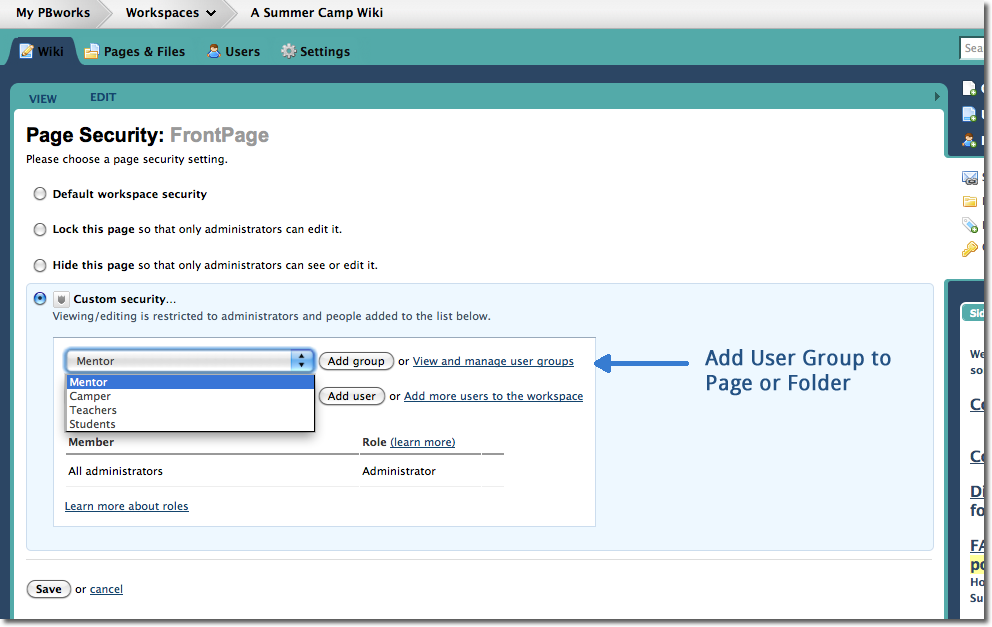
User groups make it easier to manage workspace membership and page/folder-level permissions. Each user can be added to multiple groups on your network. Like a regular user, you can add the entire group to a workspace, and grant specific permissions to each group:

Adding a User Group

When you add a group, each person in that group will be automatically added as well.  When you add a new user to a group, that user gets access to everything to which the group has been given access.  When you remove a user from a group, they lose access, unless they have otherwise been granted access.

User groups are especially useful if you need to grant fine-grained access to a specific group of people, such as the members of a department within your organization, or a client team.

Only a Network Administrator can create user groups, so if you need a new user group on your network, contact one of your Network Administrators.

If you’re a Network Administrator, check out the Group Management page in the user manual for instructions on how to create, rename, delete, and manage your user groups.

As your organization’s use of PBworks continues to grow, user groups can help you manage the increasing number of users.  For more details on user groups, visit the User Groups page in our user manual.

Don't Just Manage Customers, Collaborate With Them

Who among us hasn’t dealt with CRM (Customer Relationship Management) software?

Whenever you call up your credit card company, it’s the CRM system in the background that the overseas customer service rep is reading from.

Whenever the phone company calls you with a new offer, the CRM system is logging the call.

But curiously enough, while CRM software is supposed to *manage* the customer relationship, it doesn’t actually touch the customer.

And after your calls with your credit card and phone company, do you feel satisfied?  Or do you feel managed?

This isn’t to say that CRM is unnecessary–just imagine if those customer service representatives didn’t know your account balance or customer history when you called!  And CRM has become so important that CRM sales are measured in the billions ($14 billion in 2007).

But it is true that CRM is necessary, but not sufficient.

Here at PBworks, we’re working to extend the CRM metaphor to encompass customer collaboration as well as “management.”

Especially for customers like advertising agencies, the customer relationship is a complex, high-value, long-term affair.  It’s hard to capture it as a row in a database.  Much of the relationship has been unwritten and personal.  But with the continual change and personnel turnover that is now endemic in business, that’s no longer enough.

The solution we’ve developed in conjunction with our customers is to use PBworks as a persistent environment for collaborating with their customers.

Rather than relying on email and telephone, our customers can create a workspace for each client or client project, use it as the central hub for communications, content, and coordination, and build some long-term relationship infrastructure that doesn’t depend solely on the personal relationships of the people involved.

The new Customer Relationship Edition (CRE) that we launched today includes additional features that enhance PBworks for this use case, including the ability to track your top prospects and customers, and receive instant alerts whenever they log in, including updates on what content they’ve read or downloaded.

The CRE enhances CRM and makes it truly collaborative–something anyone who has sat on the phone with their credit card company will appreciate.

For more information on the Customer Relationship Edition, visit our website.

You can also sign up for a free Webinar introducing the CRE on Tuesday, August 10.

To request a one-on-one demo of the product, fill out this form.

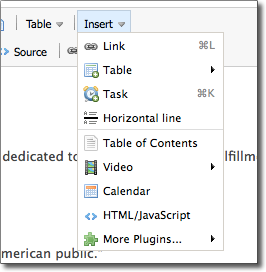
Changes to the Toolbar – New Insert Menu

This week we simplified the toolbar and made changes to they way you can add plugins, horizontal lines and tasks.

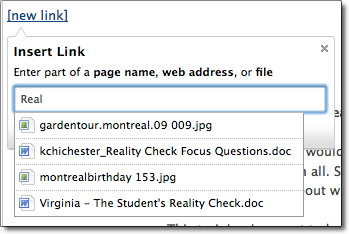
Now instead of surfing through a confusing menu of plugin options (hey, what’s a plugin!), you can now quickly chose from the most highly used options. Additionally, for Business Edition users, we’ve now made it super easy for you to insert tasks on your workspace pages.

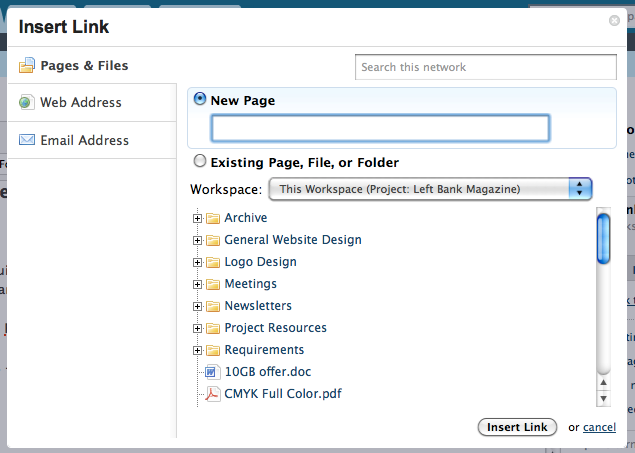
We’re also introducing a new way to add links on your workspace pages. You no longer have to chose what your linking to (URL, wiki page, file), instead just begin to type and PBworks will offer a list of existing  pages and files on your workspace.

For Business Edition users, you can now easily link between multiple workspaces.

Tell us what you think of these changes, leave a comment!

New Feature: Drag and Drop File Uploads

PBworks is excited to be the first online editor capable of instant drag and drop file upload and image insertion.  Now you can choose any file from your desktop and drag it into PBworks for instant upload. This feature only works on the latest version Firefox, Chrome and Safari.

Drag files from your desktop to the pages and files section of your workspace.  Your files will be automatically uploaded to your workspace.

You can also instantly upload files while your in edit mode.  While you’re editing, drag any file to your page.  Your files will be uploaded and inserted in your page.

Watch this short video to learn more:

http://vimeo.com/moogaloop.swf?clip_id=12957144&server=vimeo.com&show_title=0&show_byline=0&show_portrait=0&color=ffffff&fullscreen=1

Third Annual Summer Camp- Limited Enrollment

06/14/10 – Camp is closed!

—————–

It’s time for the 3rd annual PBworks Summer Camp —  the ultimate way for educators to learn how to use wikis in their school. Summer Camp participants will learn the ins and outs of using PBworks, including how to build a secure student-led site, the best way to integrate wikis with existing lesson plans and using interactive media to engage your audience.

This free training program will last four weeks from June 21nd to July 20st 2010. Camp is run by PBworks with help from experienced mentors from all over the world who support campers and share tips along the way.

Each week there will be a specific lesson on how to use your wiki. You will receive an email every Monday with a video, a lesson,  and with links to the homework, examples and more. Campers must review the video, do your homework and meet with us on Tuesday or Wednesday for a virtual presentation.

At the end of the session, Campers who have followed the program receive a free premium classroom wiki for the school year and valuable lessons along the way!

100,000 Support Requests & Improvements

After a flurry of large projects – user groups, nested folders, and whole new editor – we’ve spent some time making sure these features worked really well. This included reviewing feedback and making a lot of small changes. Here are some changes that you asked for and we delivered.

Collapsible nested folders – When we released nested folders, each folder still showed up under “Pages & Files”.  Now you can collapse folders, so you only view the top level folders.

Images using the new editor: Images now have the option to add padding. Right click on an image, choose properties to add space around your image and text.

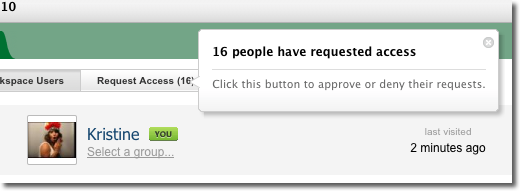
User panel – Now when someone requests access to your workspace, you are notified with a help bubble.

In other news, our PBworks support team received their 100,000th support ticket from Brandy C. This is what it looked like:

Subject: I have feedback about Nested Folders.

Yea!! This is GREAT! One of the frustrating features was the inability to nest folders! Now I can create folders for different levels/ classes and then nest folders for each project! Thank You!

We love feedback! Please continue to let us know what you want to see, and we’ll try our best to make it happen.

Create user groups and quickly set page security

Earlier this year we surveyed the top 100 educators on PBworks and asked them how we could make their workspace even better. The number one request was USER GROUPS!  Specifically people wanted to easily add the same group of users to a page or folder and make it easier to set page security.

dianemain:  I currently have my students change their display names to include graduation year and to take out full last names (so, for example, Joe Student graduating this year would become “2010 Joe S.”).

It would be great if I could put them into groups and then be able to add or remove groups of students to/from a folder instead of having to add/remove them all manually at the start and end of the school year.

Well – we listened!  Today we’re pleased to announce that all premium workspaces can create user groups.

Premium workspaces have custom security.  This allows them share pages with specific users, and hide that content from all other users.  Now you can assign page and folder-level access using the groups that you create. Here’s how:

First, place each user in a group.

Next, add the user group to set page-level access.

This feature rounds out our improvements to the user panel – now all premium workspaces can easily add groups of users to pages, and with the recent security improvements, immediately know what your users can see, and edit.

Coming Soon – Nested Folders

We’re pleased to announce that all users of PBworks will soon have access to nested folders. This means that soon you will be able to place a folder inside of another folder.

This has been one the the top requests from users and we’re excited to release this feature to our entire user base  – including free users!

The PBworks Security Model

Nested Folders is deceptively simple feature, particularly with premium workspaces that have folder level permissions.

Placing a folder inside a parent folder works exactly the same as placing a page inside a folder.  If a folder has no security controls, it will adopt the security controls on the ‘parent’ folder. If the folder has specific security controls, they will override those set by the ‘parent’ folder.

As always, the more specific security controls override those more general controls.

Learn more about PBworks Nested Folders and Folder Security.