PBwiki Mobile Edition for iPhone and Blackberry

Ever needed to access your PBwiki using an iPhone or Blackberry? Now you can, with PBwiki Mobile Edition.

PBwiki Mobile Edition automatically recognizes when you’re using a smartphone to access your PBwiki, and serves up a blazingly fast mobile-optimized interface. We’ve stripped out everything that’s extraneous to minimize load times and maximize the content you see.

And PBwiki Mobile Edition is available free of charge to our Professional and Professional Plus customers.

With Mobile Edition, you can:

  • Search your PBwiki (including uploaded files) to answer a question
  • Access policies/procedures/manuals
  • Download files to send via mobile email
  • Keep up with your team’s activities via notifications and recent changes
  • Provide instant feedback via comment
  • Record thoughts via comment or new page

Here’s what InformationWeek had to say about PBwiki Mobile Edition:

“The mobile device is a logical extension for collaboration tools, particularly given today’s fractured work environment, where contributors may be on the road more than in an office. With the digital tether of the iPhone or Blackberry, road warriors can satisfy the urge to check in on a project, make comments and keep the ball rolling.”

To try out PBwiki Mobile Edition, just visit your PBwiki using your iPhone or Blackberry (if you’re on a Professional plan) or check out our sample wiki at http://mobileedition.pbworks.com.

While we only officially support the iPhone and Blackberry, other smartphones will probably work.  Begin your Android lobbying now!

New Feature: Display the same content on multiple pages

Do you have content on your wiki that needs to be displayed consistently on multiple pages? We have build the ultimate plugin for you! It’s called ‘Include another Page’ and it’s available in your plugin menu under PBwiki Magic.

This plugin lets you embed the content from one wiki page onto another wiki page and lock it in place.

Here’s an example:

Your company has several key guidelines that must be followed for all projects. Instead of trying to remember these guidelines or search around to locate them, just post them to a wiki page.

For your next project, include your guidelines page on the project planning page so you make sure to follow them.

Here’s how:

Create the content you want displayed across multiple apges: From our examples you would post your guidelines and hit save.

untitled

Include the content from one page on a different page
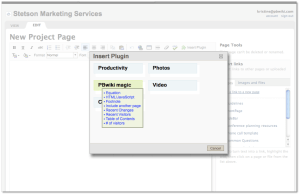
: Use the plugin ‘ Include another page’ to display the information from your guidelines page. Plugin –> PBwiki magic –> Include another page

include-plugin

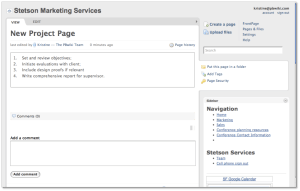
Display your content across multiple pages:Hit save and view the content from your guidelines page on your project planning page.

Included

Instead of manually inserting the content on each page, which can lead to errors if the content ever needs to be changed, this plugin takes the content of a page and instantly inserts it into your wiki.

The included content is locked, you are not able to edit content that is pulled from another page. If you want to change the content across all pages, simply edit the information on the first page – in our example, the guidelines page.

Head to our manual to learn more information about the new ‘Include Another Page’ plugin, and all the other plugins available for your wiki.

PBwiki in the news: Week of 3/9/2009

(Image courtesy of Leslie Duss)

Another busy week of PBwiki in the news, including the New York Times, local TV news, and of all things, how PBwiki helped reduce crime in one city by 25%!

The Static Document Model Is Dying–RIP .doc, .xls, and .ppt (TechCrunchIT, 3/9/2009)

  • In which I opine on the role of PBwiki in tying together the disparate components of the enterprise.

In Hard Times, Freelancers Turn to the Web (New York Times, 3/12/2009)

  • Ever wonder about the great support you get from PBwiki?  In this article, Support and Services supremo Rachel Pennig talks about using oDesk to manage her team.

It’s All About Wikis (News9 Oklahoma, 3/12/2009)

  • In case you ever wondered what a local television news story on PBwiki would look like.  Stay classy, Oklahoma.

Crime reduced in major cities through prayer-walking (Examiner.com, 3/13/2009)

  • I’m not sure PBwiki can take sole credit for the 25% reduction in violent crime in Chico, CA, but I’m sure it didn’t hurt!

Do you need to hate your enemies?

(Image courtesy of aaardvaark)

Do you need to hate your enemies?

Business is all about competition. If someone buys your solution, they’re not going to buy from your competitor, and vice versa. So do you need to hate your enemies?

Recently, Kristine, PBwiki’s customer evangelist, struck up a Twitter conversation with the product manager at Microsoft that is responsible for SharePoint’s wiki. In other words, a competitor.

She shared with him a video about how PBwiki handles linking via a simple dialog box (which, by the way, is way ahead of SharePoint’s current practice of requiring users to memorize certain codes and paste in URLs).

One school of thought would say, “That’s providing aid and comfort to the enemy!” That school of thought says that you need to hate your enemies, burn their cities to the ground, put their women and children to the sword, and salt the earth so that nothing returns.

The other school of thought says that the greatest competitor isn’t a company, it’s doing nothing.

Kristine posted her Tweet to answer a user question about linking (Microsoft’s PM just happened to interject himself into the equation).

That user, and anyone else following the conversation, will see that the team here at PBwiki is confident in who we are, what we do, and that we will win any fair fight, and most of the unfair ones.

That’s how I feel. Being open, honest, and helpful, even to your competitors, is the best way to show one’s confidence and strength. That doesn’t mean giving away the crown jewels; save those for yourself. But providing a pointer to a publicly available video, allowing competitors to sign up for the product, and focusing on solving customer problems rather than worrying about some imaginary scoreboard versus the competition makes good business sense.

Even World Class Talent Needs to Communicate

Image from derok.net

The National Basketball Association has finally reached the quarter pole of the 2008-2009 season meaning that teams have played about 3/4s of their total games.  At this point, it’s pretty easy to tell which teams have a chance of winning the championship and which teams are already dreaming about next year.

The Boston Celtics is one such team that is vying for a championship.  Lately, they’ve been in a slump due to the injury of one of their best players, Kevin Garnett.  With Garnett’s influence, the Celtics are the class of the league, without him they are just another “very good” team.  Like most NBA superstars, Garnett is blessed with supreme athletic ability, willpower and drive.  However, what the team misses most when Garnett doesn’t play is his ability to communicate during the game.   Garnett keeps his team working as one cohesive unit with his incessant chatter and masterful communication skills.

It’s interesting to note that on a team full of world class talent, it takes a strong devotion to communication in order to achieve the next level.  This holds true in many situations, whether it is a basketball game or the execution of corporate strategy.  At PBwiki, we strive to make that communication easier and more effective.  Check out some of the ways that other organizations have utilized our tools.

Example Wiki: SEOmoz Site Intelligence Services API

While we have an entire directory of public PBwikis you can peruse, we do sometimes like to single out a particular PBwiki for praise.

This week, I’d like to place the spotlight on SEOmoz and their Site Intelligence Services API wiki.

The team over at SEOmoz has done a terrific job of customizing and structuring their PBwiki. Let’s highlight some of the things they’ve done:

1) Custom domain name.

apiwiki.seomoz.org is a perfect domain for this site; even just reading the link tells you what it’s going to be about.

2) Custom logo and colors.

Using the SEOmoz logo and matching colors instantly establishes the identity of the wiki.

3) Extremely clear and informative FrontPage.

Weighing in at three paragraphs and five bullet points, the FrontPage does a great job of conveying the essential information, all above the fold to eliminate any need for scrolling.

4) Prominent contact information.

Instructions on how to get help or get in touch are right there on the FrontPage.

5) Critical top-level navigation incorporated into the SideBar.

Bonus points for bolding the “Getting more help” link so that it’s obvious where the confused should turn.

Of course, we already knew that the folks at SEOmoz had good taste…just look at who they gave their Web 2.0 Award for “Best Hosted Wiki”!

Join Alpha Team: Inside look at PBwiki


Image from http://www.collider.com/

The A-Team is a group of outspoken PBwiki experts who test out all of our newest features and let us know what they think. This year we’re looking for a few more people to join the team.

This is a great chance for you to look under the hood at what we’re developing at PBwiki and affect the way it works.

This offer is not for the meek or faint of heart! You’ll be swimming in uncharted waters, trying out brand new features as we develop them. Things might change drastically, or maybe there will be bugs. We count on our Alpha Testers being there to help us find problems that we don’t see here, on our own computers.

If you’re an experienced PBwiki user who wants to test out the latest features and tell us what you think, sign up for the PBwiki Alpha Team.

Join the PBwiki A-team

PBwiki in read-only mode – Engineers are working to fix this

01/27/09 3:06 PST
Hi everyone,

Some folks are experiencing read-only access and aren’t able to edit their wiki pages. Our engineers are aware of the problem and working on it.

Your data is safe and should be accessible asap. For up to the minute details, you can follow our updates on twitter at @PBkrissy

-Kristine

01/27/09 3:30PST
Hi again,

Your wiki and all of your data is once again accessible – both to view and edit. We tracked down and fixed a problem that was causing an infinite loop in our servers.

We’re sorry to have experienced slight downtime during your work day.

– Kristine

Official Timetable for Updating from PBwiki 1.0 to PBwiki 2.0

If you’re still on a PBwiki 1.0 wiki, you’ve probably received an email recently about updating to PBwiki 2.0. Beginning on March 9th, 2009, all 1.0 wikis will automatically update to 2.0.

Don’t worry — you have plenty of time to make the change (a free update, which takes less than 5 minutes), plus we’ve got an excellent support team waiting to help you.

When we launched PBwiki in 2005, we designed our system to be easy to edit and share. Now, 4 years later, our users have taught us a lot. You’ve told us that you want more control over users, more powerful editing/sharing features, and an improved user interface.

In 2008, we rolled out PBwiki 2.0 to address those needs. A year later, we’ve concluded that for just about every usage, PBwiki 2.0 works better than 1.0 for collaborating and sharing information. 2.0 even gives you new features like Classroom Accounts (which allow educators to invite students without email addresses) and Document Management.

Updating to 2.0 does mean learning a different user interface, but the folks who’ve made the switch will tell you it’s worth it:

Finally upgraded my pbwiki site to 2.0. why did i wait so long to do this! wow! – starryhope01

I have used PBwiki for 2 graduate courses with the same students. All of us like the PBwiki 2.0 over the earlier version. This version feels more intuitive and allows me to break the class into groups with their own work areas (folders). -Jane Allgood, Ph.D.

You can use a simple wizard to update to 2.0 (again, it’s free and takes about 5 minutes). You will not lose any content by updating to 2.0, and with Classroom Accounts (which replace invite keys), reader comments, folders, easier editing, full CSS customization, and so on, PBwiki 2.0 allows you to do just pretty much everything you could with PBwiki 1.0 and more.

You can update to 2.0 at any time, or you can wait until March 9th, and we’ll update for you.

To update to PBwiki 2.0, go to WIKINAME.pbworks.com/migration.php (just replace WIKINAME with the name of your wiki) and follow the instructions on screen!