Farewell to the BubbleShare Plugin

As the users of BubbleShare already know, BubbleShare.com will no longer provide free photo hosting after November 15, 2009. The site will be taken down and all links to albums and photos will cease to exist. (Read the official announcement here)

In light of this news, PBworks will no longer offer the BubbleShare plugin. On November 15, all BubbleShare slideshow photos embeded on PBworks will no longer display the associated images.

This only applies to photos that were embedded with the BubbleShare slideshow — all other images that have been uploaded or embedded on your workspace will not be affected.

We’re sad to see BubbleShare close their virtual doors and wish them the best of luck.

For those of you who want a slideshow on your workspace, check out Slide.com or one of the dozens of plugins listed on our plugin resource page.

Not sure where to begin? Check out this short video on how to make a slideshow using Slide.com.

Get unlimited wikis and users for your school district with District EditionN

In the beginning, individual teachers bought our Classroom Edition.  Then as word spread, entire schools bought our Campus Edition.  Now, just in time for the 2009-2010 school year, we’ve taken the next logical step and launched our District Edition.

PBworks District Edition gives each K-12 school district that signs up an *unlimited* number of wiki workspaces and users.  Now you can share PBworks with every single student, teacher, administrator, parent, and yes, janitor in your school district.

Already, districts like Baltimore County Public Schools and the Wake County Public School System have signed up…maybe you can convince your district to be next!  Here is our announcement.

Each time, we’ve been surprised by the enthusiasm for our larger Academic packages, but we think District Edition is probably the upper limit for size.  Unless….

Country Edition anyone?

New Feature – Full Screen Edit

Have you ever edited your workspace and though, “This edit box is just too small, I want more space!”

No problem! Our latest feature, called Full Screen Edit, allows you to expand your edit box to the full width and height of your screen. With full screen edit you only see the toolbar and save button, all other page elements are hidden from view.

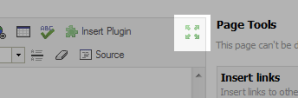
To enter fill screen edit mode, click the ‘flower’ button on your toolbar. Click once again to return to normal editing.

Full screen editor

What do you think of full screen edit? Tell us in the comments!

McTeach: Love the new addition on PBWorks! You can now switch to fullscreen mode when editing a page! Very handy!!

Summer Camp 2009 – Learn while you earn a free premium upgrade

Last year we asked educators “who wants to build the ultimate classroom wiki and have it ready for the start of the fall semester.” Over 1,500 people responded and took part in the first PBworks Summer Camp.

Check out the responses:

“I want to learn as much as I can about the “free” tools available to educators. This weeks resources page is amazing! I’ve heard and used some of the tools but will make use of many more by they end of the camp. This is awesome!”

“Thank you for all the tools and information you are providing. It is a tremendous help and is saving me a plethora of hours trying to find Internet tools to use in the classroom. I so appreciate what you’re doing.” -p.c.ames

This year we’re hosting the second annual PBworks Summer Camp where educators can learn the best way to structure your classroom site, engage your students with audio and video and connect with experienced wiki mentors.

At the end of the summer, Campers who have followed the program receive a premium upgrade.

PBworks Summer Camp is now closed, pre-register for next year and guarantee a spot!

Welcome, PBworks Project Edition!

For most of us, work is a series of projects.

We’re always drawing up plans (some more formal than others) and trying to carry them out, usually as part of a team.

That’s why it’s not surprising that so many people use PBworks for project management.  After all, if PBworks is a great solution for improving team productivity and work performance, shouldn’t it be great for project management?  And when we asked you what you were using PBworks for, “managing projects” was the #1 answer.

But in reality, while PBworks was helping a lot of people manage their projects, it was far from ideal.

Even within the company, where we use PBworks for pretty much everything (including project management), we felt the limitations of the product.  When I create a task, I want to be able to assign it to someone with a due date.  I don’t want to be forced to try to remember where I wrote down the task.  I want notifications to go out when the status of the task changes.  I don’t want to forget when things are due.  Yet manually managing projects with the old PBworks product had all of these drawbacks.

It’s a testament to the power of the product that despite these issues, so many were getting so much productivity out of it!

So over the past few months, we went back to the drawing board and started talking to our users.  We conducted dozens of interviews with consultants, PR firms, designers, marketers, and other project leads, including in-depth follow-ups.

As a result, we were able to design PBworks Project Edition, which represents a major leap in project functionality.  In our opinion, it’s the best tool anywhere for managing the vast majority of projects.

What makes Project Edition special?  Certainly we’re very proud of how we’ve created task and milestone functionality that is simple, elegant, and flexible.  But the real key is in combining project management with collaboration in a neatly integrated package.

Historically, project management separated the “management” from the real work.  Picture a Project Manager walking around with a clipboard, collecting status reports, and fiddling with Ganntt charts.  Great for putting a man on the moon, but not appropriate for all the informal, fast-moving projects that make up the bulk of our working days.

The first Web 2.0 project management tools broke the monopoly of the project manager, and put the ability to view and manage the project in the hands of the entire team, but they still didn’t help you do the real work.  You would log in, pick up your next task, then switch to another application or window to do the actual work.

Project Edition combines “management” with a collaborative platform that lets your team do their work faster and better.  Sometimes as much as 10 times better.

That’s the breakthrough we’re calling “organic project management,” since the management is a natural and organic result of doing the real work.

Our goal isn’t to displace the project management tools that people use for the 0.1% of projects that are formally managed (though you can certainly do that with Project Edition).  It’s to radically improve performance for the 99.9% of projects where the most sophisticated management tool is the Post-It pad.

You can try out Project Edition for free for 30 days and see what consulting firms and agencies like Deloitte and Ogilvy are raving about.  We’re confident that you’ll like it, even if you’ve never used any other project management tools in your work.  And if you have used other tools, we’re even more confident that you’ll find our product easier, faster, more flexible, and most importantly, more productive than anything you’ve used before.

Don’t just believe us…here’s what other folks are saying:

“Simple project management functionality, like workflow management, task assignment and milestones, is built right into the tool, so there’s no need to use a separate app like Basecamp to handle simple project management. This makes PBworks an attractive option for teams looking for a tool for collaborative project tasks, like document authoring, requirements gathering or design review. Task management is kept together with the actual task itself, which makes a lot of sense.”
—WebWorkerDaily

“A busy manager could check the new project coordination workspace to get a quick status update, use the discussion feature associated with each task to communicate with a team member, or add a new task and assign it to someone – all without ever sending an email. This feature alone makes the new PBworks Project Edition very attractive.”
—Future Changes

Get the scoop on Project Edition by visiting our Project Edition minisite.
Courses and Resources

As you work on integrating collaboration into your daily workflow, it’s often helpful to get pointers.  Here at PBworks, we provide a ton of resources, including our much-praised Support & Services team, our free monthly webinars, and our free Support Center.  Be sure to watch for our upcoming Educators’ Summer Camp as well.

But we’re not the only ones who offer courses and consulting.  Stewart Mader of Future Changes has a thriving business in holding custom workshops for everyone from Fortune 500 companies to schools.

Another provider, Blue Oxen Associates, holds regular virtual courses as well.  Their upcoming course (May 19 – June 9) features Socialtext co-founder Peter Kaminski, who will be conducting a series of four teleconference workshops for a small group of 5 registrants.

If you’re interested, Blue Oxen is offering PBworks users a special deal–$50 off registration if you use the discount code “pbworks”.  Registration closes Thursday at 5 PM Pacific.

Whatever resources you turn to, whether from us or other parties, the important thing is to seek out the help you need. The best collaboration tool is not the one with the most features; it’s the one that your team uses!

PBworks, Passion, and Sarbanes Oxley

For those of you who missed it, the podcast of our founder David Weekly’s interview with Amber MacArthur and Leo Laporte of This Week in Tech is now up on the Web.  You too can listen in and see if Amber is right in describing David as “passionate.”

But the passion doesn’t stop there, as Sarbanes-Oxley Compliance Journal runs a piece on the launch of Legal Edition, complete with quotes and picture from our CEO, Jim Groff.

Hey Oprah, when are you going to start showing us some love?

New Feature: Document Import

Introducing a whole new way to create pages on your PBworks. Our newest feature – Document Import – allows you to convert your Microsoft Office files into pages on your PBworks space.

The recent document management release allowed you to upload and share your documents and files – but it was still tricky to copy information from word and paste it onto your workspace.

“I have about 50 multi-page MS Word files that I need to bring in to PBworks, retaining links and basic formatting… I’ve tried copy/paste, but none of the formatting is retained and it takes way too long to create bulleted lists, redo hyperlinks, add bold text, etc. I’ve tried exporting the Word file to HTML, but I get all the Word garbage. “

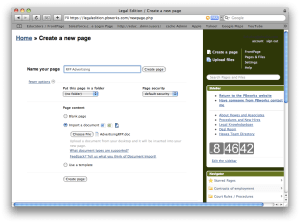
The new Document Import feature makes it unbelievably easy to import a document or spreadsheet to your PBworks, so that the document’s content is copied onto a page in your workspace.  Here’s how:

Create a new page: Title your page and choose document import

picture-20

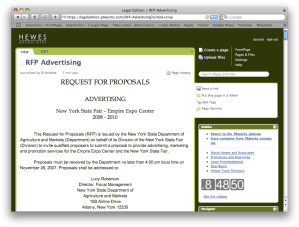
Your new page will display all content – including images and color formatting – from your original word document.

picture-22

That’s it! This is now a live page in your workspace, you can edit and change the formatting of your page.

Here’s a quick Q&A about the new document import feature:

Q: What files can I convert to pages on my workspace?
A: You can convert MS Word (.doc, .docx), WordPerfect (.wpd), Open Document Format (.odt), Plain text (.txt), MS Excel (.xls, .xlsx), Open Document Format (.ods), Comma-separated Values (.csv)

Q: Can I export my page as a word document?
The document import allows you to create workspace pages from your Microsoft office files, but you can not export them to Microsoft files just yet.

Q: How do I turn on this feature?

As always, there is nothing to download or turn on.  This feature is already available on all premium business workspaces – including the new legal edition PBworks. Try it today by creating a new page on your PBworks space.

Plan Your Next Event with PBworks

Mashable has a great little piece on how to plan and promote your next event with social media.  I particularly liked this paragraph:

“PBworks: The wiki is an ideal platform for planning events – it’s easy to add notes, edit information, and organize content. Both mediawiki (the software that runs Wikipedia) and PBworks (formerly PBwiki) are good choices, but PBworks has been a favorite of organizers because of its business features, better document-sharing features, and RSS notifications.”

If you have an upcoming event, don’t forget to make PBworks part of it!

You think our name should be….

When we announced last week that we were changing our name from PBwiki, thousands of people took their best guess at our new name. More than a few wondered what could possibly be better than Peanut Butter Wiki and only two people guessed the new name – PBworks. Here are some of the more interesting names you suggested:

Hundreds of food related suggestions:

  • Corndog- Because using our site is as good as meat on a stick.
  • BLT – a bit more sophisticated, but still easy!
  • Dagwood- your wiki offers it all
  • SteakandPotatoes.com (The new “beefed-up” version)
  • OrderOut – even easier than make a PB&J, and tastier to boot!

Several business focused suggestions:

  • AdeptShare – because PBWiki makes anyone adept at sharing data
  • SynergyPlus
  • Infoshare (easy as pie–)
  • GroupShare

Suggestions that made us laugh

  • If you develop a collaborative motion control interface, you could call it Wiikii.
  • The company formerly know as PBwiki
  • Easier Than Falling Off A Log Wiki
  • And, because it’s the internet, we had two votes for ColbertWiki.