New feature preview – Navigation Improvements

In the next few weeks your workspace navigation will be automatically updated. This update will change how you access your core collaboration features, making them easier to discover and use. The navigation impacts how you:

  • Create and manage wiki pages
  • Access uploaded documents and files
  • Share the list of users on your workspace User
  • Manage project plans (Business Edition)

Changes on Stand-alone workspaces:

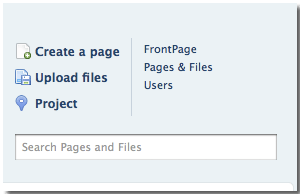
Top level navigation to access your my.pbworks.com account and navigate between your many workspaces by clicking ‘workspaces’.

Tabs to easily view your wiki, pages & files and settings. The settings tab is only available to workspace administrators.

User Tab that all users can see.  Now the user list will be viewable to all users on your workspace.

Changes on Business Edition Network Workspaces:

Top level navigation to access your network dashboard and navigate between your recent workspaces by clicking ‘workspaces’.

Tabs to easily view your wiki, pages & files, tasks, and settings. The settings tab is only available to workspace  administrators.

User Tab that all users can see.  Now the user list can be viewed by all members of your workspace.

These screenshots are just a preview and the navigation may look slightly different when it’s activated on your workspace.

Tell us what you think of the new navigation!

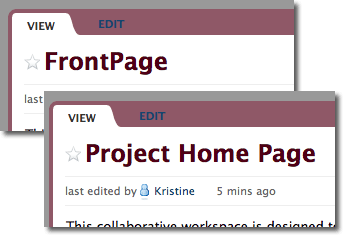
Rename your Front Page

page name change

The front page of your wiki is the first page that users see and acts as the table of contents for your site. Information on the front page should explain the purpose of your wiki, how you want users to participate and important pages that users can navigate to when getting started.

Now you change the name of your front page to more accurately reflect the purpose of your wiki.

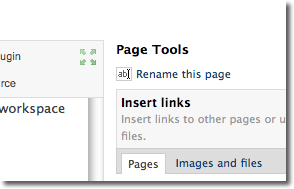
To rename your page, choose edit and click ‘rename this page’.

pagetools

Join 2010 PBworks A-team

pbwikialphateam_logo

The A-Team is a group of outspoken PBworks users who test out our newest features and let us know what they think. This year we’re looking for a few more people to join the team.

This is a great chance for you to look under the hood at what we’re developing and affect the way it works.

Alpha Team feedback is extremely important. The 2009 A-Team informed many, many decisions about which features were too crazy for prime-time and which features would work for our customers.

This offer is open to experienced PBworks users who feel comfortable testing out features that don’t exactly work, have bugs and may break. None of the alpha team features should be used on client facing workspaces!

——
02/26/2010 – The PBworks A-team is no longer accepting new members. We will open it to more folks in the future. If you’re interested in joining, check back to http://blog.pbworks.com. Thanks!

Support PBworks at Enterprise 2.0

This year the team at PBworks is in the running to present at the Enterprise 2.0 conference. We’re need your support – please take a second and Vote for us here!

Thanks to all the folks who have already voted and left comments like:

Love working with pbworks with my management consulting clients and my family! – David Purdy

PBWORKS is great software – been using if for more than 2 years! It makes our organization work – could not live without it! – Roger Rydberg

The Enterprise 2.0 conference is the best place for companies to learn how emerging technology can improve on the current legacy systems that are eating away at the productivity, efficiency and mental balance of everyday employees.

Last year we were excited to host a booth and announce our new live editing and voice conferencing capability . These new features make it easy for the non-technical person to host remote presentations, share their screen and set up conference calls. (With nothing to download and no additional set up cost!)

This year we’re excited to participate once again. Thanks for helping us make that happen!

New User Panel for all Networked Workspaces

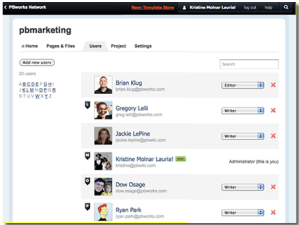
Until today only administrators could see who is on a workspace, and what permission level each user has. It’s pretty difficult to work on collaborative projects when you can’t see who’s on your team! With the new user panel all users can see who is on the workspace and what workspace-wide permission level they have. Administrators can access the users panel from workspace settings, all other users will see a link in the top right of their workspace. Here are three reasons why we love this feature:

  • Now you can quickly find your coworkers email and check out their latest status update
  • Better understand exactly what your clients can see by checking their workspace-wide permission level
  • Sort by name, permission level, even email address! It’s easy to find who your looking for.

What non-administrators will see: users image

What all users will see: NEW USERS2 See a larger image here

Introducing the PBworks Template Store

The Template Store serves many professions
(Image appears courtesy of Joe “Shiggy” Sciglitano)

The great thing about PBworks is that you can use it to do just about anything.

The bad thing about PBworks (at least for those of us who tell its story for a living) is that you can use it to do just about anything.

Saying that PBworks combines wikis, document management, project management, social networking, microblogging, and real-time communications (with integrated voice coming soon) requires strong lungs.  More importantly, simply listing all the features in PBworks doesn’t necessarily tell you how it solves *your* particular problem.

That’s why we built the Template Store.

Not only does the Template Store show how you can use PBworks workspaces to solve specific problems, you can clone these examples into your own PBworks network, where you can customize them to meet your needs, or even convert them into custom workspace templates.

Plus, all 25+ of our templates are free of charge to PBworks users.

There are templates for specific industries (e.g. a Client Engagement Template for consultants, a PR Client Extranet for marketers) as well as specific functions and processes (a Branch Office Intranet for corporate use, a Presales Extranet for sales, and a Competitive Analysis Template for marketing).

If you’re already using PBworks Business Edition (formerly Project Edition) or Legal Edition, you can access the Template Store from your network — chose ‘Workspaces’ and select “Template Store.”

If you don’t currently have a network, you can preview the Template Store here.  You can even submit your own templates for inclusion.

Check out the Template Store and see if there’s a template to solve your problem.  And if not, leave a comment, and we’ll work on building one!

Real Time Collaboration now on all networks

Last month we announced a groundbreaking set of new features available in our Real Time Collaboration update.Throughout the next two weeks, these features will be activated on all networks.

With these features all users, including network and guest accounts, will be able to:

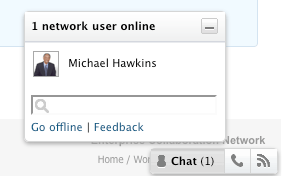
  • Chat in real time– With PBworks IM, you can chat from a workspace or network.
  • Broadcast live, streaming edits– Editors can share real-time page changes to other users on the workspace.
  • View activity updates in your workspace– Receive immediate notification of changes to starred pages and activity from the network users you follow.
  • Learn more about these features in our user manual.

Activate Real-Time Collaboration Features

As announced at Enterprise 2.0, we’re working to bring a suite of real-time features to all Project Edition networks. Today we’re excited to announce the beta launch of PBworks IM, Live Editing and Instant Notifications.

We’re still refining this release so the features work perfectly, but you can start using them with your network now. Here’s how network admins can turn on real-time collaboration:

  • Go to Network Settings
  • Chose ‘Real Time’
  • Activate!

This is a beta release which means there may be some unexpected behavior. If you see something that doesn’t work exactly as it should, please send feedback! We even have a feedback link built into your IM chat.
Picture 4

Read more about how to use the Real Time Collaboration features in our user manual.

Video: New Feature Run Down

We made this video for Enterprise 2.0 to display the key features of our recent releases — Project edition, social release features and the upcoming real time chat, live editing and voice conferencing features.

Fast forward to 1:44 to see the new real-time collaboration features in action or watch the entire video to catch up on features you may have missed.

http://vimeo.com/moogaloop.swf?clip_id=7480100&server=vimeo.com&show_title=1&show_byline=1&show_portrait=0&color=00ADEF&fullscreen=1

Enterprise 2.0 Booth Video from PBworks on Vimeo.

Introducing PBworks Real-time Collaboration

A few weeks back, we asked you to guess what we’d be announcing at Enterprise 2.0.

You need wonder no longer.

On Monday, PBworks announced its real-time collaboration update.  Starting on November 17, Project and Legal Edition customers will have a whole new way to use PBworks to work together.

  • IM Collaboration
  • Live Notifications
  • Live Editing
  • Voice Collaboration (early 2010)

IM Collaboration will allow users to see who else in their organization is actively using PBworks at that moment, and send them instant messages from within the product.  In addition, users will also be able to summon others to the workspace page they’re working on using the “send a link” function built into the IM system.

Live Notifications will alert users to activity within their organization in real-time, rather than requiring them to await an asynchronous email notification.  Users can select which notifications they want to receive, based on “starring” or “following” particular pages and other users, and the system will stream the relevant notifications to whatever page a user is viewing.

Live Editing will eliminate the need to use web conferencing services such as WebEx, PlaceWare, and GoToMeeting to share a PBworks editing session.  Whenever a user is editing a workspace page, the other users viewing that page see the edits appear in real-time.  When combined with IM Collaboration, Live Editing makes it easy to convene an ad hoc meeting for working synchronously.

Voice Collaboration is the fastest and easiest way to set up a conference call with other members of your organization.  Rather than setting up a conference line in advance and asking attendees to dial in, PBworks Voice Collaboration allows you to initiate an instant conference call by dialing the desired participants.  You can add new participants at any time, and each conference call is recorded and stored for later review.  Voice Collaboration can even be triggered using your iPhone, making it the first conference calling application that works on that platform.

If a user is editing a page and realizes that he or she needs the input of other team members, he or she can summon them to the appropriate page using IM Collaboration, start a Live Editing session, and use Voice Collaboration to initiate an instant conference call, all in fraction of the time it would take to set up a web conference, set up a conference call line, and communicate the details to the intended participants.

We’re pretty excited, but don’t just take our word for it; you can read about what other people have to say:

http://www.techcrunch.com/2009/11/02/collaboration-platform-pbworks-gets-a-real-time-makeover/

http://digital.venturebeat.com/2009/11/02/pbworks-speeds-up-collaboration-with-real-time-communication/

http://www.readwriteweb.com/enterprise/2009/11/pbworks-goes-for-a-real-time-f.php

http://webworkerdaily.com/2009/11/02/pbworks-to-add-real-time-collaboration-tools/

http://www.eweek.com/c/a/Messaging-and-Collaboration/PBworks-Watchitoo-Crave-Google-Waves-Realtime-Collaboration-Hype-412241/

http://www.cloudave.com/link/pbworks-ups-the-ante-with-real-time-collaboration-features

http://www.informationarchitected.com/blog/iam-alert-pbworks-takes-it-realtime/

http://collaborate.com/?q=blog/2009/11/02/pbworks-offers-new-real-time-functions