Riding the Wave: A History of Real-time Collaboration

Courtesy of thelastminute

Now that I’ve started to talk with analysts and other early adopters about PBworks’ upcoming Real-time Collaboration update (more on that later), one of the very first questions I always get is, “Is that like Google Wave?”

Many people, even industry experts, are under the impression that Google Wave is the first product to offer real-time collaborative editing.  Nothing could be further from the truth.  In fact, real-time editing has been around for decades.  So in the interests of the common good, I’m offering this brief history of real-time editing.

While true industry pros will tell you that real-time editing has existed since the PDP-10 era, the first citation that appears on Wikipedia is Instant Update for the Mac, circa 1991.  More recently, the primary real-time editor that people cite is SubEthaEdit, though this product remains relatively unknown outside of developer circles.

In the wiki/collaboration world, real-time editing has been around since JotSpotLive…which, ironically enough, was acquired by Google (and then dumped in the dustbin).

More recently, Etherpad (disclosure, I am a personal investor in its parent company, AppJet) launched its web-based real-time collaboration tool in November of 2008, and has built up a tidy little following.

So by the time that Google Wave emerged in May 2009, real-time collaboration had been around for nearly 20 years, and had even existed as part of the Google family (prior to JotSpot’s burial at sea).

That’s not to say that real-time collaboration, being old rather than new, isn’t groundbreaking.  In fact, we here at PBworks believe it has a ton of potential…the key is figuring out how to apply it to the all-important task of getting work done.

We think we’ve done so, and will be unveiling the PBworks take on real-time collaboration at the Enterprise 2.0 conference (which you can attend for free!).

Those of you who are PBworks customers and users, stay tuned next week for a special sneak preview….

Introducing Network User Signup

One of the recent requests we received from a Project Edition customer asked, “Can I set up my network so that anyone from my company can join the network, without my having to invite them?”

This made a ton of sense, especially as Project Edition gets rolled out to ever larger numbers of corporate customers.  That’s why we’re introducing our simple, two-step Network User Signup system.

Step 1: Specify trusted email domains.

You can now set up your PBworks network so that anyone from a trusted email domain (such as mycompany.com) can join the network.  Just click on “Network Access” within the “Settings” tab:

Network Access Settings

You can even whitelist and blacklist specific IP addresses for added security.

2. If you have an email account on a trusted domain, you can now join the network.

First, click the “Join this network” link:

Network Access screen

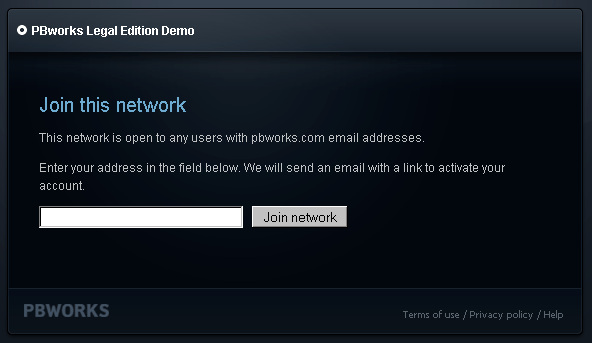
Next, enter your email address.  We’ll send you an email with instructions on how to set up your network account:

Enter email address screen

You can specify as many email domains and/or IP addresses as you need to.

PBworks Is Announcing Something Big at Enterprise 2.0 (and you can be there)

No, not that Enterprise 2.0

Join the PBworks team at Enterprise 2.0 in San Francisco (November 2-5), where we’ll be making a major announcement and giving live demos of groundbreaking new functionality.

You can meet the team, get one-on-one advice, and help us show those Enterprise 2.0 folks just how much we all love PBworks.

Best of all, you can get into the exhibit hall for free–just register using the discount code “EXPOPASS”.

As an added bonus (as if you needed one), every PBworks user who stops by our booth (Pod 22) will get a free T-shirt, and every customer will get a free massage from Kathy, our corporate masseuse.

Stay tuned for more clues about the big news, and see you at the show!

P.S. Think you know what we’re announcing? Leave your best guess as a comment, or better yet, Tweet it using the hashtags #pbworks #e20conf.

PBworks adds support for Google Chrome, drops Firefox 2

I do a lot of cross browser testing as part of my job as Gentleman of Quality (Head of QA) here at PBworks and I keep a close eye on which browsers our users are adopting and which ones are fading away. I’m pleased to announce that we’re adding support for Google Chrome, an excellent browser that is rapidly becoming the standard for high performance on the web. In addition I’m glad to see the vast majority of Firefox users have upgraded to the latest version of that browser. If you haven’t done so already (and just over 1% of our users have not) please take a moment to upgrade. PBworks will no longer fix bugs that appear exclusively in Firefox 2.

Modern browsers are faster, more secure, and much more helpful. We understand there are a number of you who are still forced to use ancient, dangerous, and painfully buggy browsers such as IE6, but overall the adoption of new browsers has been surprisingly quick.

(Note: We are still supporting IE6, since many corporate IT departments mandate it, but if you have a choice to upgrade to IE8 or another modern browser, we *strongly* recommend that you exercise that choice!)

PBworks is excited about the possibilities that modern browsers allow for and want all of our users to share in those benefits. Upgrade your browser today:

Google Chrome
Firefox 3.5
Internet Explorer 8

Ian Danforth
Gentleman of Quality

PBworks Launches Its Social Collaboration Update

If you’ve ever wondered how the functionality of Facebook and Twitter might be able to help you get your work done, the PBworks Social Collaboration Update gives you the chance to find out for yourself.

Starting today, PBworks Project Edition (and PBworks Legal Edition) now includes social networking-style user profiles, Twitter-style microblogging, and the ability to create wiki pages (with file attachments) just by emailing a single email address.

We encourage you to try out these new features (which are included in every 30-day free trial of Project Edition) and let us know what you think in the comments for this post.  We’d love to hear your take!

If you want to learn more first, check out the Social Collaboration Update page, and the frequently-asked-questions below.

Frequently Asked Questions

How is this different from all the other social software products out there?

  • PBworks isn’t a social software product.  Our focus is on helping people get work done.  We look at individual business problems, and then try to find technology that solves that problem.  We’ve tweaked each of the features to reflect this emphasis:
    • Our user profiles allow the corporate administrator to specify the fields and choices, so that you can create a searchable database of locations, skills, certifications, or anything else the company deems relevant (PBworks’ own employee profiles include Myers-Briggs personality type)
    • Our user profiles also include activity history (edits, uploads, comments, task updates, etc.) and tasks so that you can tell what a person has been doing, and what they’re planning to do.  This combination of static and dynamic information presents a clearer picture of each user for the purposes of getting work done
    • Our microblogging solution is integrated into our overall activity streams.  This means that you have real work context (what they’ve been doing) for each person’s posts.

What good are social networking-style profiles in the enterprise?

  • We found that our customers with geographically dispersed workforces needed a better way to identify the relevant people within the organization to turn to for everything from social media experience to the most granular of technical certifications.

What good is microblogging in the enterprise?

  • Our users told us that microblogging was really good for unstructured, real-time collaboration like brainstorming.  The ideas the generated that way could then be put into more structured collaboration tools like workspace pages or project workspaces and tasks.

How much will this update cost?

  • Nothing!  It’s a free update to our Project and Legal Editions.

Do your user profiles integrate with Active Directory?

  • No, but that’s a great suggestion.  You can use AD and other LDAP solutions to log into PBworks, but we don’t currently carry over user profile data.  Definitely on our roadmap.

Where can I see a demo?

A/B Testing at PBworks

At PBworks, we take our data seriously.  So it should be no surprise to learn that we use A/B testing techniques to aid our product and website development decisions.  Having a web-based product means that we can quickly learn what our customers like and what they don’t like and make changes accordingly.  If you’re not familiar with A/B testing, Avinash Kaushik has a great primer.

Analyzing Test Results
As the data analyst here, an A/B test for me can be reduced to just a few simple numbers.  Those would be: (1) the difference in conversion rate from the control group and (2) the level of confidence we have in that difference.  The first number is easy to calculate and explain to the rest of the team, e.g. “The test site resulted in 30% more sign ups that the current site.”  Everyone gets that: engineers, marketers, and managers.  As an example, here is how one of our recent website experiments played out over a 2 week period:

chart_only_conversions

In the chart, each day shows the cumulative conversion rate (i.e. total sign ups since the beginning of the test divided by the total visitors since the beginning) for the test site (Test) and the current site (Control).  Notice how well the test site is outperforming the current site.

However, anyone who’s played games of chance can tell you numbers that look good on this turn, may not be so hot on the next.  For example, if you flip a quarter 5 times and it came up heads 4 times, would you feel confident on betting that the coin is biased towards heads?   What if you flipped 80 heads out of 100 tosses?  At this point, you’d be much more confident that the coin is biases towards heads.  In our A/B test, we measure the conversion rate for a small subset of all visitors, let’s say 10,000 visitors with 100 sign ups.  Do we believe that the this conversion rate will be the same for the millions of visitors we expect in the months to come?  Do we need to test 1,000,000 visitors to be confident that the observed increase will apply to all visitors and was not just the luck of the draw?

Statistical Confidence
Statistician have figured out a way to calculate a numerical representation for the confidence that the population (i.e. the millions of visitors our site will see in the future) will show an increased conversion if the sample (i.e. the thousands of visitors that have hit the test site so far) shows an increase.  Though we have this reliable, albeit complex, formula for the confidence number (using a 2-proportion z-test, or an online calculator), explaining what this number means to the rest of my team hasn’t always been easy.  How would you interpret: “We saw a 30% increase in sign ups and we’re only 90% confident there is an increase.”  What this means is that if we ran this test 100 times, we’d expect in 90 cases to see an increase (though not necessarily a 30% increase) and in the other 10 cases to see a decrease or no change.  For some organizations, this would be enough confidence to make the test site the actual site for everyone, for others, it wouldn’t.  The decision of what confidence level to use comes down to a trade off of speed and certainty.

Unlike coin flipping, though, recreating the experiment over and over again would take too long and negate most of the gains we expect from A/B testing.  So it is difficult for some to internalize what this confidence level represents.  Many people, especially those that are risk-averse, don’t like dealing with probabilities and will keep asking for more data.  But you’ll never be 100% certain that the test site is better converting than the current site.  So at some point you need to stop collecting data and make a decision.

Sunrise Charts
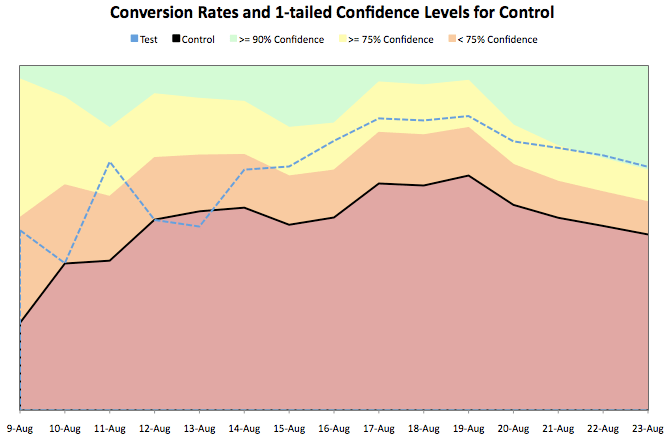
What I’ve found to be a useful aid in getting many of the risk-averse types to accept some risk has been to overlay confidence areas in the time series chart like so:
chart_with_confidence

My team has dubbed this a “Sunrise Chart” (yeah, I’ve never seen a green sky during a sunrise either, but you get the picture).  The solid black line and dashed blue line are the same as in the previous chart and the colored bands represent confidence levels.  If the test line veers into the green area we have a 90% level of confidence that the test site out-converts the current site.

Many of the less technically-inclined members of my team find that this chart makes sense on a more intuitive level than a statement like: “We saw a 30% increase in sign ups and we’re 90% confident there is an increase.”  The chart shows this same information, but it also shows two other things.  First, the random day-to-day fluctuations in conversion rate average out and the rates stabilize over time.  When people see more stable conversion rates, they are more inclined to feel confident in the difference they see.  Second, this chart shows that as we collect more data over time, a smaller and smaller increase is needed to reach a specific confidence level.  This is essentially the same piece of information as seeing the conversion rates stabilize, but since these confidence bands are generated from a complex mathematical formula, it gives some peace of mind that the underlying math is jibes with their gut.

Conclusions
To wrap things up, at PBworks we believe that A/B testing is an important tool to develop the most relevant software for our customers.  However, when experimenting, it is not enough to simply compare the conversion rates of the test site with the current site.  We want some level of certainty that if we do see an increase, it is not simply due to a lucky draw.   That is where confidence levels come into play.  Finally, and perhaps most importantly, it’s not enough for just the technically inclined to “get it” with a statistical analysis of the results.  Rather the whole team needs to be on board with the decisions that result from the experiment, so everyone needs to be comfortable with the analysis.  This is when Sunrise Charts can be a valuable aid.

You've Got Great Taste, Steve

Look familiar?
Look familiar?

You may not know this, but I’m a huge fan of the Fake Steve Jobs.  The real one ain’t half bad either.

I remember hearing Steve talk at a dinner honoring him, and some poor schlub was foolish enough to ask Steve, “Now that Dell makes MP3 players, how is the iPod going to compete?”

(This was a number of years ago, when Dell was considered the titan of the PC industry, and Apple was a niche player.)

Steve delivered a withering look of utter contempt and said, “It’s called good taste. People will pay for you to tell them what’s cool.” (here’s a more extended version of this story)

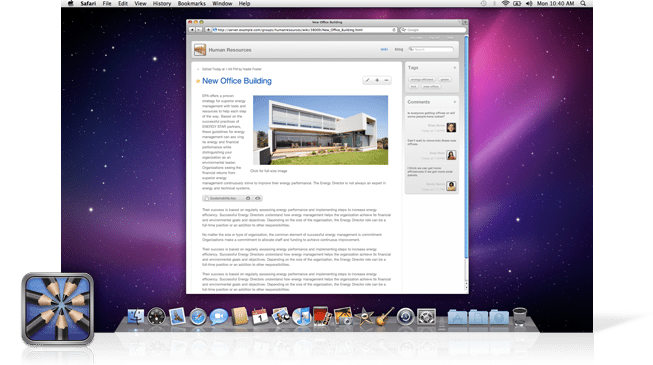
The point is, Steve knows good taste.  Steve knows what looks good.  And so it is with considerable pride that our engineering team pointed out to me today just how much Apple’s wiki server resembles PBworks.

It’s a dead ringer, down to the interface for starring pages.

As Picasso once said, “Good artists copy.  Great artists steal.”

We stole the inspiration for PBworks 2.0 from Apple’s clean interface style.  It is an honor to have the favor returned.

As Fake Steve himself might put it, “Namaste, Apple.  I honor where our sense of aesthetics become one.”

Farewell to the BubbleShare Plugin

As the users of BubbleShare already know, BubbleShare.com will no longer provide free photo hosting after November 15, 2009. The site will be taken down and all links to albums and photos will cease to exist. (Read the official announcement here)

In light of this news, PBworks will no longer offer the BubbleShare plugin. On November 15, all BubbleShare slideshow photos embeded on PBworks will no longer display the associated images.

This only applies to photos that were embedded with the BubbleShare slideshow — all other images that have been uploaded or embedded on your workspace will not be affected.

We’re sad to see BubbleShare close their virtual doors and wish them the best of luck.

For those of you who want a slideshow on your workspace, check out Slide.com or one of the dozens of plugins listed on our plugin resource page.

Not sure where to begin? Check out this short video on how to make a slideshow using Slide.com.

Get unlimited wikis and users for your school district with District EditionN

In the beginning, individual teachers bought our Classroom Edition.  Then as word spread, entire schools bought our Campus Edition.  Now, just in time for the 2009-2010 school year, we’ve taken the next logical step and launched our District Edition.

PBworks District Edition gives each K-12 school district that signs up an *unlimited* number of wiki workspaces and users.  Now you can share PBworks with every single student, teacher, administrator, parent, and yes, janitor in your school district.

Already, districts like Baltimore County Public Schools and the Wake County Public School System have signed up…maybe you can convince your district to be next!  Here is our announcement.

Each time, we’ve been surprised by the enthusiasm for our larger Academic packages, but we think District Edition is probably the upper limit for size.  Unless….

Country Edition anyone?

New Feature – Full Screen Edit

Have you ever edited your workspace and though, “This edit box is just too small, I want more space!”

No problem! Our latest feature, called Full Screen Edit, allows you to expand your edit box to the full width and height of your screen. With full screen edit you only see the toolbar and save button, all other page elements are hidden from view.

To enter fill screen edit mode, click the ‘flower’ button on your toolbar. Click once again to return to normal editing.

Full screen editor

What do you think of full screen edit? Tell us in the comments!

McTeach: Love the new addition on PBWorks! You can now switch to fullscreen mode when editing a page! Very handy!!