Introducing the new Settings Panel on all 2.0 wikis

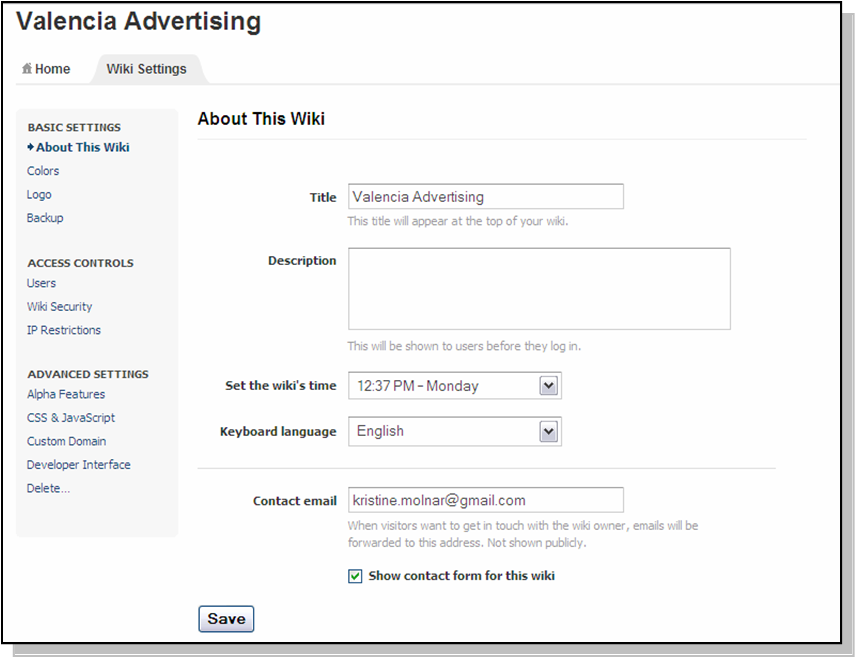
Yesterday, we rolled out a new settings panel for all PBwiki 2.0 wikis, making it easier to control the settings on your wiki.
New PBwiki Settings Panel

See details about the new settings panel.

(Note: Don’t miss out on new features! We’ll be releasing new features for 2.0 wikis, so if you haven’t converted to PBwiki 2.0 yet, please click the “Convert now” banner at the top of your wiki to update for free. If you don’t see the banner, please sit tight for a short time while we finish polishing a few features for your wiki. We’ll enable you to update to 2.0 as soon as possible.)

And let us know what you think!

New feature: Classroom accounts for students without email addresses

For the last several months, we’ve been researching and designing a new way to add users to wikis without email addresses — notably, K-8 students.

Today, we’re happy to announce a new feature, Classroom Accounts, which will let you add users without email addresses. In consultation with dozens of educators, we’ve created a system that makes it unbelievably easy to add your students to your 2.0 educational wiki.

First, I’ll show you a video of the feature. Then, we’ll go into detail using a short tour with screenshots.

Video overview of Classroom Accounts (0:43):

http://www.vimeo.com/moogaloop.swf?clip_id=1512150&server=www.vimeo.com&show_title=1&show_byline=1&show_portrait=0&color=&fullscreen=1
Classroom Accounts from PBwikiWebinars on Vimeo.

Now, let’s look closer at each of those screens to see how they work.


In your new PBwiki 2.0 settings panel, you’ll see a small graphic to invite users without email addresses.
Flickr Photo Download- Classroom accounts #1_1218567260187

Enter in how many students need accounts and what permission level they should be assigned. Note that you should have a printer to complete setting up Classroom Accounts.
Flickr Photo Download- Classroom accounts #2_1218567359036

Type in your students’ names and we’ll automatically create student-friendly passwords. Don’t have time to enter all your students’ names? Just click “Continue” and we’ll automatically create usernames for you.
Flickr Photo Download- Classroom accounts #3_1218567137387

That’s it! Now click “Print” to print your usernames and passwords.
Flickr Photo Download- Classroom accounts #4_1218567382694

Here’s a view of the handy PDF so you can hand it to your students. We paid special attention to the design of the PDF to make it easy to cut and distribute. We also email you a copy of your new Classroom Accounts.
Classroom accounts #5

Q&A
Q: “I’m still on PBwiki 1.0. How do I switch to 2.0?”
A: If you haven’t converted to PBwiki 2.0 yet, please click the “Convert now” flag at the top of your wiki to update for free. If you don’t see it, please sit tight for a short time while we finish polishing a few features for your wiki. We’ll enable you to update to 2.0 as soon as possible.

Q: “I have PBwiki 2.0 but I don’t see this option. Where is it?”
A: This feature is enabled for educational wikis only. If you need to switch categories, please click “Help” at the top-right corner of your wiki and let our support team know. They’ll switch you over right away.

Q: “I have another question about Classroom Accounts.”
A: No problem. To get help, check out the PBwiki manual entry on Classroom Accounts.

Based on testing, we’ve heard some great feedback on this feature. If you’re an educator, give it a shot. And, as always, let us know what you think!

* * *
Note: Attention educators! Are you interested in getting a free Gold Premium wiki (value: $250) for your classroom this year? Sign up to get an early look at the PBwiki Back to School Challenge.

Other feedback? Please let us know!

New Feature: Improved Settings Panel

Right now the improved settings panel is being rolled out to all education wikis, all others will see this new setting next week (Aug 18, 2008).

Today wiki administrators will see an improved settings panel — with a new interface and easier navigation.

The new setting panel has three categories:

Use the ‘Basic Settings‘ features to customize your wiki – change the color or upload your logo.
Use the ‘Access Controls‘ to invite users, change your wiki’s security setting, or set request access.
Use the ‘Advanced Settings‘ if you want to add custom CSS or modify your wiki’s API.

Feedback?
We love feedback! Please let us know what you think.

New and improved RSS feeds for your 2.0 wiki

We’ve just rolled out improvements to PBwiki RSS feeds.

What are RSS feeds?

RSS feeds are a great way to stay up-to-date when you have lots of things you’re interested in. You can subscribe to a feed and have new information show up automatically as soon as it’s available. PBwiki has offered RSS feeds for quite some time now, but this week, we rolled out a great new version for 2.0 wikis that is much more powerful.

The improved PBwiki RSS feeds

  1. The Recent Changes feed. This includes all of the changes being made on your wiki that you have permission to see: page edits, comments, file uploads, you name it.
  2. Page-specific feeds. This includes all of the edits and comments made on whichever wiki page you’re currently looking at.
  3. Folder-specific feeds. These show up if you’re looking at the contents of a folder on your wiki.

Try them out today and you’ll be hooked. If you’re not familiar with RSS, don’t worry: most browsers come with RSS readers built in, so it’s easy to get started. Take a look in your browser’s address bar for the RSS icon (it usually looks like Firefox RSS icon or Safari RSS icon). When you click it, you’ll get a list of available RSS feeds:
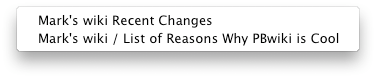
List of available feeds

Click the one you’re interested in and subscribe. Be sure to let us know what you think!

Pre-register for the next PBwiki Camp

Over 1,500 teachers signed up for PBwiki summer camp. Check out what they’re saying:

“This course is incredible and the amount of info is overwhelming 🙂 not in a bad way”

“I want to learn as much as I can about the “free” tools available to educators. This weeks resources page is amazing! I’ve heard and used some of the tools but will make use of many more by they end of the camp. This is awesome!”

“Thank you for all the tools and information you are providing. It is a tremendous help and is saving me a plethora of hours trying to find Internet tools to use in the classroom. I so appreciate what you’re doing.” -p.c.ames

PBwiki Summer Camp has been so successful and we want to make sure everyone has an opportunity to participate. You can now pre-register for the next free PBwiki camp and be the first to know when it’s taking place.

Register here

Search 2.0: Now Better, Faster, Stronger

Mmm, dogfood. Here at PBwiki, we make use of our own product pretty extensively. And having used an internal PBwiki for some three years, we’ve accumulated a pretty large collection of material! This makes it ever more important that we be able to search it and find what we’re looking for. So we’ve dramatically overhauled (and improved) search.

You may have noticed when PBwiki search improved a few weeks ago, getting phrase search, boolean inclusion/exclusion, and filename matching. Well hold onto your pants, because you ain’t seen nothin’ yet.

Search has been dramatically restyled again:

  • Information about who last edited a page and when
  • Suggesting page names similar to your search query
  • An adding helpful icons to the result list to let you quickly distinguish wiki pages from PDFs
  • Giving up to 200 characters of “snippet” context (vs 80 previously)
  • Ranking search results and interleaving results from wiki pages, discussions, and filenames
  • Letting you drill down to only search pages with a given tag or in a certain folder

OLD Search:

NEW Search:

Coming very soon? The ability to search inside PDFs, Word DOCs, Excel files, PowerPoint, and more.

If you have feedback about this new feature, what you like and don’t, please chip in here and I’ll read every comment! 🙂

PBwiki status update

In our excitement to push out some great new features today, we introduced a bug that made notification emails on your 2.0 PBwikis act a little strange: messages were including changes you were already notified about, and timestamps were showing up in GMT. Both of these issues have been fixed, and you shouldn’t see any last side-effects.

The problem was in effect from approximately 4:48 PDT to 5:50 PDT. We’re sorry for the issues in notifications that were sent out during this time period.

Can PBwiki Help You Get A Job?

eWeek suggests that publishing information on your wiki may help techies in the job search:

Like the Academia from which the industry sprung, career Techies have long sought publishing – professional journals, trade publications, books – as a means to push their process, tout their technique and promote their name.

The concept has never been easier thanks to the Wiki and it’s the first place a Web 2.0-phobe should turn to self-promote “add business value to your career,” said Joe Gentry, CTO and Senior VP of Software AG, who fancies himself knowledgeable in the matters of IT career navigation.

“If you are a developer, analyst or administrator with a couple of decades under your belt, you’ll probably concede (as a good corporate citizen) that there’s a bunch of business domain knowledge stored inside your head that ought to be passed along to others in the organization before you call it a career,” Gentry said. “But writing a stack of traditional user manuals is like eating dirt, right?”

The author is kind enough to then link to PBwiki (along with two other companies who shall remain nameless) as a great tool to create and share your knowledge.

If you go down this path, don’t forget to share your knowledge with others by submitting your site to the Public PBwiki Directory.

PBwiki in the News: Awards, Saving Lives in Iraq, and Helping Contractors

We’ve got a couple more PBwiki stories to share…

We’re #1!  We’re #1! We’re #1!

SEOmoz gave PBwiki 1st Prize in the “Hosted Wikis” category of the annual Web 2.0 Awards.  We’d like to thank the Academy, our director, our co-stars…but now they’re cueing the music and shooing us off the stage.

Wikis at War

Over on the Wikinomics Blog, we’ve got a guest post up about how the University of Wisconsin is using PBwiki for a research project to help protect troops in Iraq from attacks by equipping Hummers with airless tires that are harder to disable.

I’ll Finish Remodeling The Kitchen After I Check My Wiki

PBwiki reaches out to contractors with an appearance in the LowesForPros newsletter from the popular home improvement superstore.  We talk about how PBwiki makes creating your own company intranet a lot easier than you might think.  Now if only you could use your walkie-talkie to post edits….

Join PBwiki summer camp and earn a free classroom wiki

Want to build the ultimate classroom wiki and have it ready for the start of the fall semester?

Join us for PBwiki Summer Camp!

We know that a lot of educators have heard about wikis but just aren’t sure how to use them in the classroom. In PBwiki Summer Camp you will learn the best way to structure your classroom site, engage your students with audio and video and connect with experienced wiki mentors.

At the end of the summer, Campers who have followed the program receive a free platinum wiki for the school year, as well as some fun swag along the way.

PBwiki Summer Camp is full – we are no longer accepting applications for new campers! If you would like to sign up for the next PBwiki Camp,